How to Write SOPs Your Team Will Actually Use
Write your first one-page SOP this week, test it on someone new, and make sure it gets used.
For Australian businesses where the know-how lives in a few people's heads
Every business has tasks that only go right when a certain person is in. A newer team member asks the same question for the third time, bookings get made one way on Mondays and another on Fridays, and when your most experienced person is on leave, small mistakes start costing money. Writing it all down sounds like a project nobody has time for, so it never starts, or it ends as a manual nobody opens.
This guide shows you how to write an SOP your team will actually use, starting with the task that costs you most when it goes wrong. You'll pick the task, record the person who does it best, turn that into one page, test it on someone who's never done it, and check after 30 days that it's being used. It takes about three hours, and you don't need new software.
In short
To write an SOP your team will use, start with one task: the one that costs you most when it's done wrong. Ask the person who does it best to do it once while they talk you through it, and record it. Turn that into one page: what it's for, when, what you need, numbered steps and how to check it's right. Give the page to someone who's never done the task, and fix every place they stop. Keep it where the work happens, give it an owner, and check after 30 days that it's being used.
Before you start
- Time: roughly three hours of yours over a week or two: 20 minutes to pick the task, 15 to record, an hour to write it up, half an hour for each of two tests, and 15 minutes for the 30-day check. Your best person gives 15 minutes.
- Who: you or your practice or operations manager, the person who does the task best, and someone who's never done it.
- What you need: a phone or the screen recorder already on your computer, a document, and a test client or practice record, so no real client's details end up in a recording.
- What you'll end up with: your tasks ranked, one finished SOP, proof that someone new can follow it, what the gap was costing, and a 30-day check in the diary.
- Checked: the rules and sources in this guide, November 2026.
Only have 15 minutes?
Start here. Pick the task you were asked about most this week, and ask the person who does it best to talk you through it while you record on your phone. Tomorrow, write down the steps they said as a numbered list on one page, and give it to the next person who does the task. Every question they still ask is a missing step.
Three words, plainly
An SOP, or standard operating procedure, is the written way your business does one routine task, step by step, so whoever does it gets the same result. The government's business.gov.au describes procedures as "detailed instructions for a task", and policies as "high-level guidelines for your business". So a policy says what must happen and why, and an SOP says how. A checklist is the short form of an SOP: the steps or checks as tick boxes, used while the work is done.
Why don't SOPs get used?
Most fail for one of four reasons, and each one has a fix you'll use in this guide.
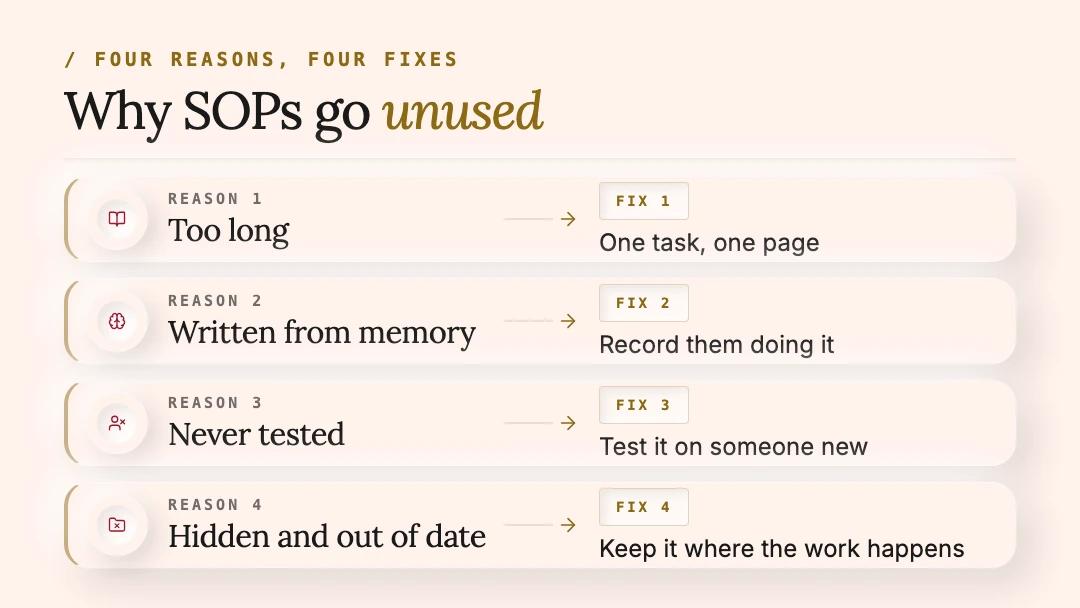
Most SOPs fail for one of four reasons. Each one has a fix in this guide.
The five steps below put the four fixes to work.
Step 1: Which task should you write down first?
Not the whole business, and not the easiest task. Start with the one that costs you most when it's done wrong or done differently, then work down the list.
To copy: the task picker
One row per task, with seven columns: task; how often (1 to 3); cost of a mistake (1 to 3); how many people do it (1 to 3); how often people ask (1 to 3); only one person knows? (yes or no); total.
Or download the SOP worksheet (Excel): it adds up the scores, puts your tasks in order, and has the test sheet, the cost sums and the 30-day check for the later steps.

An example: booking a new client scores highest, so it's written first.
The other view. Not every task needs an SOP. They pay off on routine work, which is how the EPA defines them. One-off jobs and judgement calls, such as pricing an unusual job or calming an upset client, are better taught with a conversation and a few real examples. And hands-on skills still need someone to show them.
Step 2: How do you get it out of their head?
Don't ask your best person to write it. Ask them to do the task once while they talk you through it, and record it. It takes about 15 minutes of their time.
To copy: five questions to ask while you record
• What are you checking here? • What usually goes wrong at this step? • How do you know it's done right? • What do you do when [the usual exception] happens? • What would you tell someone on their first day?
Asking the person who does the task to show you also helps them back the result. The EPA's guide says involving the people who do the work "promotes 'buy-in' from potential users of the SOP".
Recordings and screenshots can show client names, health details or tax file numbers, which are personal information. In a clinic, record at a quiet time, with a practice record and no patients in view. Keep recordings in the same place, with the same access, as your client files.
Step 3: How do you write it on one page?
Turn the recording into one page with the same parts every time, so your team always knows where to look. Here's a template, a prompt that drafts it from the transcript, and an example.
To copy: the one-page SOP template
• Task: a verb and a thing, such as "Book a new client's first appointment". • What it's for: the result, in one line. • When: what starts it. • Who: who does it, and who to ask. • You need: the logins, forms and information to have ready. • Steps: five to ten numbered steps, one action each, starting with a verb. Add a screenshot or a short video for any step done on a screen. • Check it's right: how you know it's done properly. • If something's off: the two or three usual exceptions, and what to do. • Owner and review: who keeps it current, when it was last checked, and the next review date.
Or download the one-page SOP template (Word): a blank page to fill in or print, the clinic example below, and the writing tips and prompt from this step.
Write it the way you'd say it: short steps, plain words and real numbers. "Call back within two hours" is a step; "Respond promptly" isn't. Five to ten steps is a rule of thumb, not a rule: if a task needs more, it's usually two tasks, so make it two pages.
To copy, if you use an AI assistant: a prompt to draft it from the transcript
Turn this transcript of [role] doing [task] into a one-page procedure with these headings: Task, What it's for, When, Who, You need, Steps, Check it's right, If something's off, Owner and review. Write five to ten numbered steps, one action each, starting with a verb, in plain Australian English. Keep their method, tips and warnings. Where something is unclear or missing, write [CHECK] instead of guessing. [Paste the transcript here]
Use an AI assistant in a business plan you already pay for, and take out names and contact details first. The privacy regulator, the OAIC, recommends that organisations "do not enter personal information, and particularly sensitive information" into publicly available AI tools. [CHECK] marks anything the assistant wasn't sure of, so you know exactly what to ask your expert. Then check every step against the recording.

Fifteen minutes of your best person talking it through becomes one page.
Does a short list help people who already know the job? In a 2009 study across eight hospitals in eight countries, a 19-item surgical safety checklist went with fewer deaths after surgery (down from 1.5% to 0.8%) and fewer complications (down from 11% to 7%). It's surgery, not a front desk, and the study shows the two went together rather than proving cause, but it suggests short written steps can help even experienced people.
Example, for a clinic or professional firm (adapt it to your work)
• Task: Book a new client's first appointment. • What it's for: every new client is booked correctly, knows what to bring, and gets their forms before they arrive. • When: a new client calls, emails or books online. • Who: the front desk. Ask the practice manager if you're unsure. • You need: the booking system, the new-client form link and the price list. • Steps: 1. Check they're new: search their name and phone number. 2. Ask what they need help with, and note it in a few words. 3. Offer the first two suitable times. 4. Book it as a new-client appointment. 5. Read back the day, time and address. 6. Send the confirmation with the new-client form. 7. Note how they found us. • Check it's right: the booking shows the new-client type, and the confirmation has gone. • If something's off: no suitable time in two weeks: offer the waitlist. Anything urgent: ask the practice manager before booking. • Owner and review: the practice manager, every three months.
The same page works for other businesses: for a builder it might be "Book a site visit", and for an accounting or law firm, "Open a new client file".
Step 4: Can someone new follow it?
A good SOP passes one test: someone who has never done the task follows the page, with no help, and gets it right. Until it passes, it's a draft.
To copy: the test sheet
One row per step, with four columns: step; where they stopped or asked; what they asked, or did instead; what you changed.
The EPA's guide asks for the same: it's "especially helpful if draft SOPs are actually tested by individuals other than the original writer", and an SOP should let someone with limited experience "successfully reproduce the procedure when unsupervised". Why test twice? When Nielsen Norman Group studied website testing, the first person watched showed "almost a third" of the problems, and each new person added fewer. That was websites, not procedures, but the lesson carries: the first test finds the big gaps, and the second checks your fixes.

An example: the first tester stopped twice. After two fixes, the second finished with no questions.
The other view. A page isn't the whole of training. For tasks with real risk, someone new should do the task under supervision until a manager signs them off. Our post on the fastest way to train new staff sets that out shift by shift.
What is the missing SOP costing you?
Mostly time: the same questions answered again, the same mistakes fixed again, and the hours spent training each new person by hand. Put in your own numbers, and you'll know what one good page is worth.
- Questions: hours a week spent asking and answering × hourly cost × 48 working weeks = what the questions cost a year. For the hours, multiply the questions each week by the minutes each takes, and divide by 60.
- Mistakes: mistakes each month × what each one costs to fix × 12 = what the mistakes cost a year.
Example, with made-up numbers
Someone asks how to do the task six times a week, and each question takes about 20 minutes of people's time: 10 for the person asking and 10 for whoever answers. That's two hours a week, so at $60 an hour over 48 working weeks, it's 2 × $60 × 48 = $5,760 a year. On top of that, the task goes wrong twice a month, and each fix costs about $250 in time, refunds or redoing the work: 2 × $250 × 12 = $6,000 a year. That's $11,760 a year from one task.
One page won't make all of that disappear, but it shows what's at stake, and which task to write first. Training time adds to it too, so count the hours it takes to teach the task to each new person by hand.

With made-up numbers, one task's questions and mistakes add up to $11,760 a year. Put yours in the worksheet.
People leaving makes it bigger. Just over 1.0 million employed Australians, 7.2%, changed their employer or business in the year to February 2026, according to the ABS. At that rate, a team of 20 can expect one or two people to move on each year (7.2% of 20 is about 1.4), and whatever they knew that isn't written down goes with them.
Step 5: How do you make sure it gets used?
An SOP nobody opens is just a document. Put it where the work happens, make it the first answer when someone asks, and check after 30 days.

A month on, with made-up numbers: one question a week instead of six, and no mistakes.
The 30-day check
- Is the team using it? Ask them, and look at who's opened it if your tool shows that.
- Are the questions about this task down? Count them for a week, the way you scored it in Step 1.
- Has it gone wrong since? Was a step missing or unclear?
- Is anything in it out of date?
- What's next on your list? Book the next 15-minute recording.
After that, keep a rhythm: one new SOP every week or two from your list, and a quick look at each one every three months, asking the people who use it what would make it better. business.gov.au gives the same advice: "Regularly review your processes and procedures. This should include asking staff how you could improve them."
Questions owners ask
Quick answers to common questions, the Australian rules in brief, and where to go next.
What is an SOP?
A standard operating procedure is a written, step-by-step way of doing one routine task, such as how your front desk books a new client. The EPA's guide defines it as "a set of written instructions that document a routine or repetitive activity".
How long should an SOP be?
One page for one task, with five to ten steps as a rule of thumb. If it needs more, it's usually two tasks.
Should an SOP be a document or a video?
Both work, and they work best together. A short video shows anything done on a screen or by hand, and the page is what people check while they work.
Can ChatGPT write an SOP?
ChatGPT or another AI assistant can draft one quickly from a transcript of your expert doing the task, but it can't know how your business does it. Give it the transcript, not a blank request, take out client details first, and test the draft on someone new before anyone relies on it.
Do we need SOP software?
Not to start. Keep your SOPs where your team already works. As a rough guide, dedicated SOP software earns its place when you have dozens of procedures, need sign-offs, or want to see who has read what.
Is an SOP the same as a SWMS?
No. A safe work method statement (SWMS) is a work health and safety document for high-risk construction work, such as work where someone could fall more than two metres, and it must be prepared before that work starts. An SOP can cover any routine task. If your team does high-risk construction work, you need the SWMS as well.
How often should we update an SOP?
The same week the task changes, plus a quick look every three months. Ask whoever spots a wrong step to flag it straight away, so the page stays trusted.
The rules in Australia, in brief
- Safety: work health and safety laws require a business to "provide adequate training, information and instruction to ensure that each worker is safe from injury and risks to health" (Safe Work Australia). Written procedures help, but they don't replace training and supervision for risky tasks. High-risk construction work also needs a SWMS before it starts, under Safe Work Australia's model Code of Practice for construction work. Each state and territory enforces its own laws, so check with your regulator.
- Privacy: recordings and screenshots of client records hold personal information. Record with test data where you can, keep recordings with the same access as client files, and keep client details out of public AI tools. Health practices are covered by the Privacy Act whatever their size (OAIC).
This is general information, not legal advice.
Where to go next
Built to Teach, our book on training, explains the why behind each step:
- why the know-how matters: What you actually own: the knowledge of the business (chapter 2);
- show, do and check: The anatomy of training that sticks (chapter 3);
- recording instead of writing: Capturing what's in people's heads (chapter 4);
- a video, a page or in person: The format library (chapter 5);
- keeping it used and current: Running it day to day (chapter 6);
- more prompts: The prompt pack (chapter 11).
Two of our posts go further:
- How to document business processes your team will actually read, a shorter read with a four-week plan for when someone resigns;
- How to stop your staff answering the same questions every day, for finding the next tasks to write.
Setting this up across your business, so the know-how is captured and kept current, is what our Team Training service does.
Sources
Checked in November 2026.
Want a hand with the first few?
Book a call and bring your task list, even if it's only the top three. We'll go through it with you and tell you honestly which ones to write first, what it would take, and whether you need us for it.
BOOK A CALLNo upselling and no hidden costs. If it isn't worth doing, we'll say so.