How to stop missing leads when you're busy: get every call, form and message into one list, reply automatically, and give each enquiry an owner.
In this article
Your studio's busiest weeks are when enquiries go quiet. You're presenting to clients, the team is on deadlines, and a call, a website form and an Instagram message all wait until someone has a spare minute, usually at night. By then, some of those people have heard back from someone else.
Here's how to stop missing leads when you're busy: not by checking your phone more often, but by setting up the business to catch, answer and assign every enquiry while you're with clients.
The short answer
To stop missing leads when you're busy, catch every enquiry in one place, send an automatic reply that says when you'll be in touch, and give each enquiry one owner with a time to call back. That way enquiries wait for you in a list, not in five inboxes, and nobody is left wondering whether you got their message.
Why busy studios miss leads
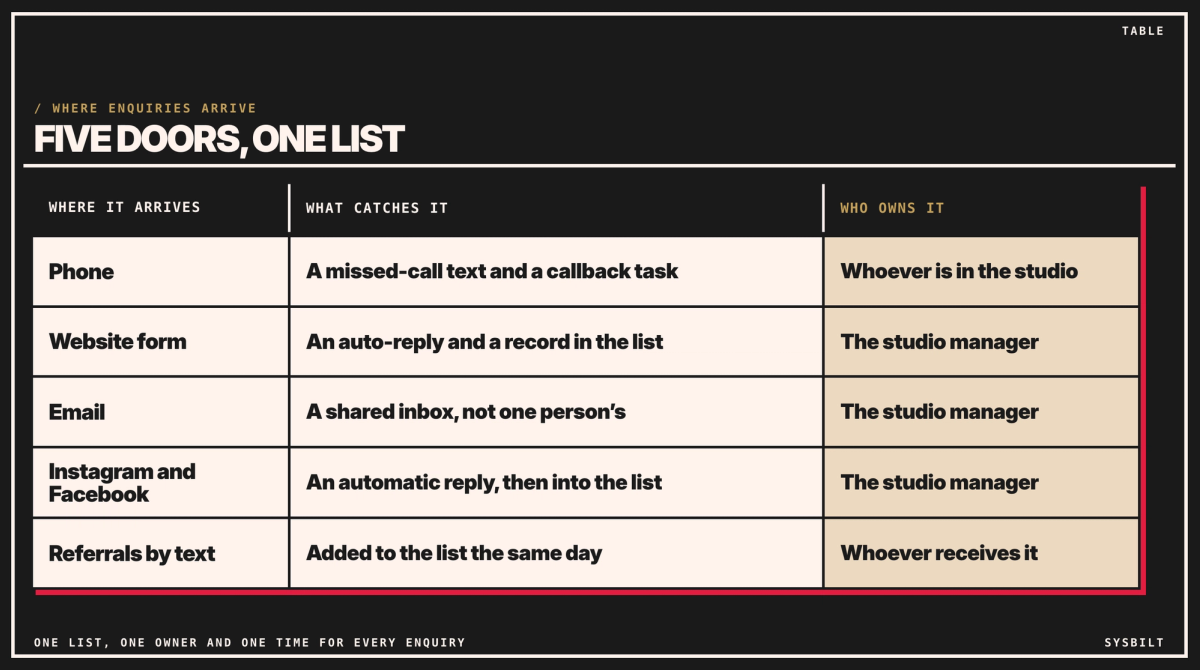
Enquiries now arrive through five doors: the phone, your website form, email, Instagram or Facebook messages, and referrals by text. Each lands somewhere different, and each waits until the right person checks it.
Someone planning a project may contact more than one studio. If they do, the first to reply has the first conversation.
This isn't new. Researchers who tested how US companies handled online enquiries, for Harvard Business Review in 2011, found that most companies "are not responding nearly fast enough". That research is old, and one of its three authors founded InsideSales.com, a sales software company. It's still the best we could find: most newer figures online come from companies that sell reply software.
Three things that catch every enquiry
01Catch: one list for every enquiry
Every call, form, email and message should end up in one list, with the time it came in, where it came from, who owns it and when to call back. The best place is a CRM (the software that holds your client list), such as HubSpot or Pipedrive, and our HubSpot vs Pipedrive comparison can help you choose. If you don't have one yet, a shared spreadsheet with one row per enquiry works for the first month.
- Website forms can add a row or a CRM record automatically, and send the enquirer an automatic reply. Whoever looks after your website can set that up.
- Missed calls get an automatic text with your name and when you'll call back, and become a callback task, added by your phone system's missed-call alert or by whoever answers the phone. Our post on the missed call your business can't afford to ignore shows how.
- Emails go to a shared address, not one person's inbox, and get an automatic reply.
- Instagram and Facebook messages can get an instant reply from Meta Business Suite when someone messages for the first time, and an away message when you're not available. Someone adds each one to the list the same day.
02Reply: an automatic answer that says when
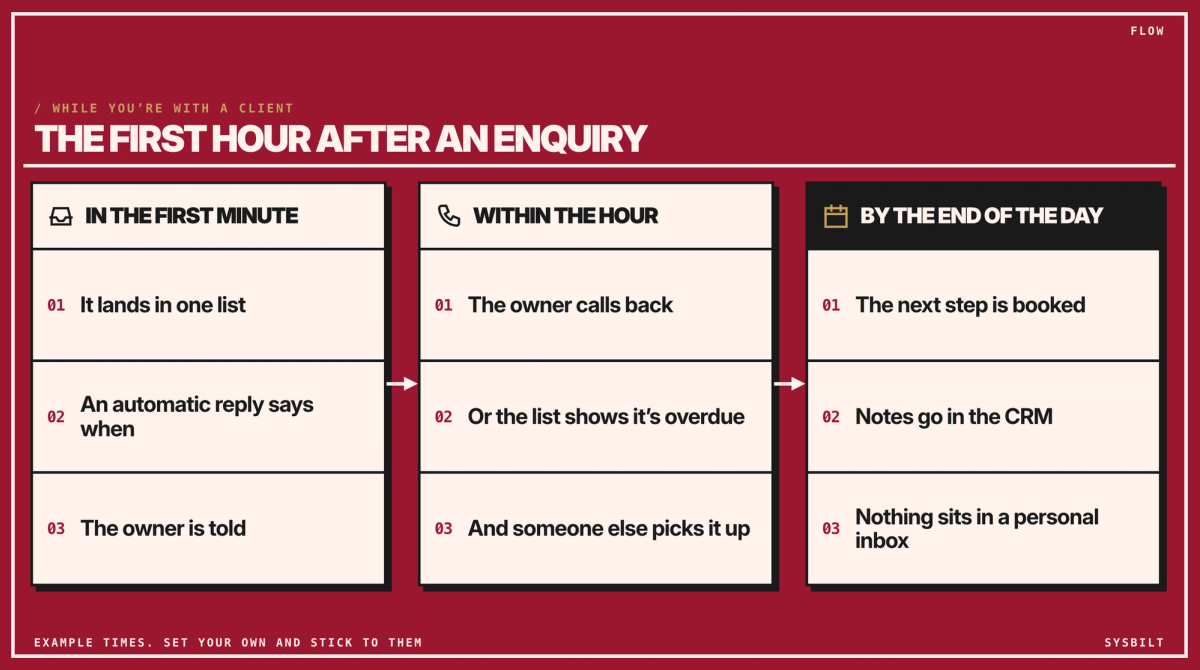
Within a minute, every enquiry should get an automatic reply: thanks, who you are, and when they'll hear from you. "We'll call you by 5 pm today" beats "We'll be in touch soon", because it tells them whether to keep looking. Referrals by text are the exception: they reach someone's own phone, so whoever receives one replies personally the same day, with a time, and adds it to the list.
For a studio, it can be as simple as: "Thanks for getting in touch with [studio name]. [Name] will call you by 5 pm today to talk about your project. If it's urgent, call us on [number]." Write it in your studio's voice and sign it with a real name, so it doesn't feel automated.
A text that only answers their enquiry, and says who you are, is a reply to them. Offers or news are different: ask first, because ACMA's spam rules need consent, your name and an easy way to unsubscribe.
03Own: one person and one time for each enquiry
Each enquiry needs one owner and a time to call back, such as within the hour during studio hours, or by 10 am for anything that came in overnight. That's sooner than the 5 pm the reply promises, on purpose: aim for the hour, and promise a time you can keep on your busiest day. Name the owner for each way in: in an eight-person studio, the studio manager might own the form, email and Instagram, while whoever is in the studio that day takes calls. Give each one a backup for when they're away. Put that time in the list's "call back by" column, so it shows what's overdue and nothing waits on someone's memory.
You don't have to answer at night. Enquiries that arrive after hours get an away message with a time, such as "we'll call you by 10 am", and the owner works through the list first thing. When a call is done, the owner books the next step, such as a consultation, and adds a note to the list so anyone can see where it's up to. If an enquiry isn't a fit, the owner still replies, politely and quickly, and marks it closed.
Start tonight with what you already have
You don't need new software to begin:
- 01Set up a shared email address, such as enquiries@, and point your website form at it.
- 02Turn on automatic replies for that address and in Meta Business Suite, with the time you'll call back.
- 03Start a shared spreadsheet with seven columns: when it came in, how it came in, who it is, who owns it, call back by, when they were called back, and the next step with its date, such as "proposal by Friday". Sort by "call back by": any row past its time with no callback is overdue.
Treat the spreadsheet as a 30-day start. Once the habit works, move the list into a CRM: it does the same work with less typing and fewer gaps.
How to tell it's working
After a month, look at the list. How many enquiries came in, through which doors, and how many were called back by the time in the "call back by" column? Then send a test enquiry through each door that has an automatic reply, and check the reply arrives within a minute. Any gaps show you where enquiries were slipping before.
Don't forget the leads you already have
Past clients are easy to forget when you're busy. Add a reminder to check in with each one a few months after a project ends, with no sales pitch. When a friend asks them for a designer, you're the name they remember.
The same list catches proposals you've promised but not sent: put "proposal by Friday" in the next-step column, so it doesn't sit in your drafts for three days.
We set this up so every call, form and message lands in one list in your CRM, gets a reply within a minute and has an owner. That's part of our CRM & Lead Tracking service, which makes sure every enquiry, by phone or form, gets followed up.
Start this week: write down every place an enquiry can arrive, and who checks each one. If the answer is "nobody" for any of them, book a 15-minute call with our team in Sydney. We'll go through the list with you, and you'll leave knowing the first two things to set up. There's no obligation after the call, and we don't upsell.

WRITTEN BY
Felipe Chaparro
Systems Architect and Founder of SYSBILT. Felipe engineers custom automation, AI workflows, and performance web architectures for scaling Australian service businesses.