Visitors but no calls? Find where the calls get lost, from a slow page to a hidden number, with the fix for each and the order to do them in.
In this article
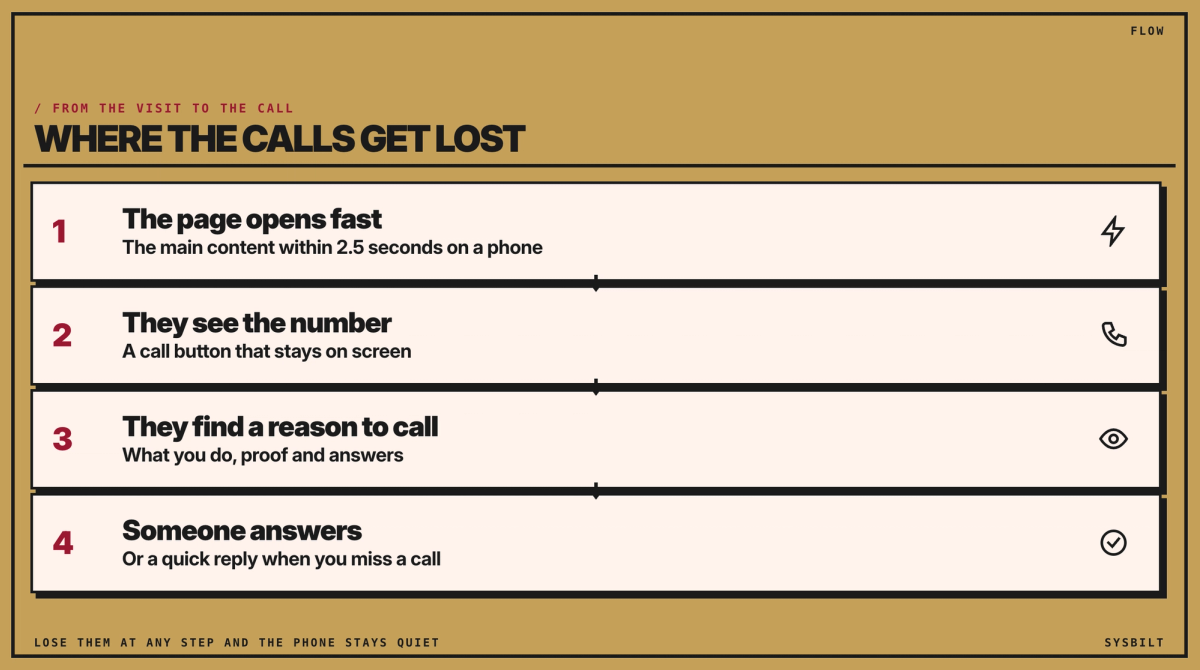
Your website is up, people find it, and the phone still doesn't ring. When that happens, the calls are being lost somewhere between the visit and the dial. The page is slow on a phone, the number is hard to reach, nothing gives people a reason to call, or the calls come and nobody answers. This post helps you find which one it is, and points you to the fix.
The short answer
If your website gets visitors but your phone stays quiet, check four things in order: the page loads fast on a phone, the number is easy to tap, the page gives people a reason to call, and the calls you miss get a quick reply. Checking takes a few minutes. Most fixes are jobs for whoever looks after your site.
A two-minute check on your phone
- 01Open your site on your phone, away from the office wifi. If you're left waiting for the page, so are your visitors.
- 02Look for the number. Can you see it, or a call button, without scrolling? Tap it, and check that it opens the dialler.
- 03Read the first line. Does it say what you do and where?
- 04Look for proof near the button: recent reviews, and photos of your team and your work.
- 05Ring your own number after hours. What happens is what your callers get.
Find the cause: what you see, and what to fix
Start with what you can see, and the table points you to the likely cause.
| What you see | The likely cause | The first fix | Where we cover it |
|---|---|---|---|
| Visitors leave within seconds | The page is slow on a phone | A smaller main photo, and add-ons such as chat that load after the page | How fast your website should load |
| Visitors stay, but nobody calls | The number is hard to find or tap | A call button that stays on screen on phones | Below |
| They read, but don't get in touch | Nothing gives them a reason to call | Reviews, your own photos and answers to their questions near the button | Below, and the true cost of a cheap website |
| Calls come, but you miss them | Nobody can answer, or it's after hours | Ring back quickly, or a reply that names your business | Below, and how to track phone calls |
| Few visitors from Google | Google doesn't know who you are or where you work | A complete Google listing, and your business details on the site | Local SEO, and Google Business Profile vs a website |
| You can't tell what's working | Calls aren't linked to where the caller found you | Call tracking | How to track phone calls |
Two of those posts are linked in the sections below. The other three are under Read next, at the end of this page.
Make it fast on a phone
Google's line is 2.5 seconds on a phone for the main content, usually the big photo or headline at the top, to appear. You can test it in a minute with PageSpeed Insights: in the result, look for Largest Contentful Paint. If yours is slower, the usual fixes are a smaller main photo, chat windows and other add-ons that load only after the page appears, and a server, the computer your host uses to send your site, that responds quickly. These are jobs for whoever looks after your site. If you're not sure who that is, start with the agency that built it, or whoever sends your hosting invoice. Our guide to how fast a website should load shows how to read the test, and has an email you can send them.
Put the number in reach
On a phone, keep a call button on screen as people scroll, so one tap opens the dialler. On a computer, put the number in the header. If it's only in a menu or the footer, people have to hunt for it. If clients book online or book a visit, put that button beside the number.
A short form helps people who'd rather not call. Keep it to their name, their mobile and what they need.
Give people a reason to call
People call when they can see what you do, who's behind it, and that others have trusted you.
- Say what you do, who it's for and where in the first line. "Welcome to our website" says nothing.
- Put recent reviews near the button, not on a page they'll never open. If your profession limits testimonials, as health advertising rules do, show what you can: your team, your experience and your answers.
- Use photos of your team and your work, not stock photos.
- Say who runs the business and how long you've done this work.
- Answer what they'd ask before they dial: what changes the price, what you don't do, and how soon you can help.
Answer the calls you can't take
Some enquiries come in when nobody can pick up, including after hours. Ring missed calls back quickly, or have an answering service or a reception team take them. If you text instead, the simplest text answers their enquiry and says who you are. If you want to send offers or news later, ask first: ACMA's spam rules need consent, your name and an easy way to unsubscribe.
Call tracking, which gives each source its own phone number, shows you which calls were missed, and where each caller found you.
Tell Google who you are
For local searches, Google leans on your Google listing (your Google Business Profile, the profile that shows on Google Maps) and on your website. Complete the listing, and keep your business name, address and number the same everywhere. Then ask your web developer to add your business details in a format Google can read, called structured data. Our Local SEO guide, under Read next, has the code they need.
Six fixes, in this order
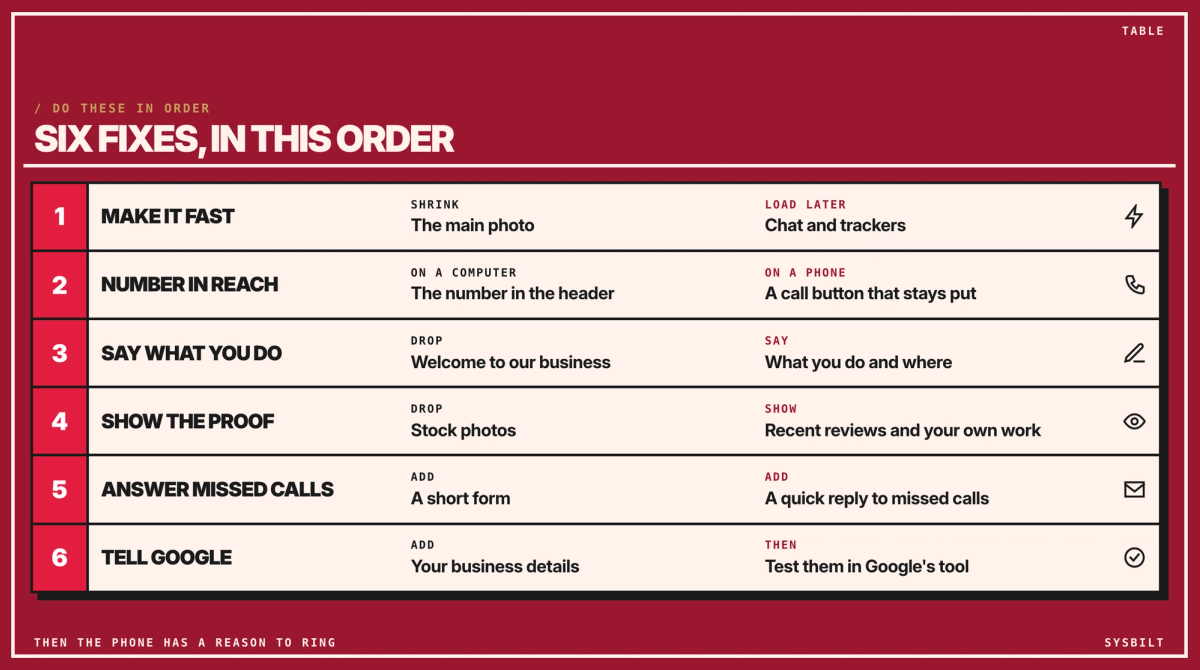
Here's who usually does each one, and how long it might take, as our rough estimate:
- 01Make it fast on a phone. Whoever looks after your site. About two hours, if the photo and the extras are the problem.
- 02Put the number in reach. Whoever looks after your site, or you on a website builder. About an hour.
- 03Say what you do in the first line. You. About two hours.
- 04Show the proof. You, with your reviews and photos. About two hours.
- 05Answer the calls you miss. You decide who rings back, and whoever looks after your site adds the form. About three hours to set up.
- 06Tell Google who you are. Your web developer. About an hour, then a run through Google's Rich Results Test to check it.
That's about 11 hours of work in all, not one evening.
Send this to whoever looks after your site. Paste it into an email and fill in the gaps:
Hi [name],

Our website gets visitors but not many calls. Could you quote for these, one by one?
1. Mobile speed: test [page address] in PageSpeed Insights, and get Largest Contentful Paint under 2.5 seconds.
2. A call button that stays on screen on phones, and our number in the header.
3. A short contact form: name, mobile and what they need.
4. Our business details as structured data (LocalBusiness), checked with Google's Rich Results Test.

Please send me the new PageSpeed result once it's done.

Thanks,
[your name]
If you'd rather have it done, that's our Websites & E-commerce service, which covers business websites, not just online shops.
Book a 15-minute call with our team in Sydney. Bring your site's address and, if you have them, your agency's details. We'll tell you honestly which of the six your site needs and what to ask for, and we don't upsell.

WRITTEN BY
Felipe Chaparro
Systems Architect and Founder of SYSBILT. Felipe engineers custom automation, AI workflows, and performance web architectures for scaling Australian service businesses.