What business tasks should stay manual? Five processes to keep with a person, what to automate around each, and five questions to decide the rest.
In this article
A family rings at 2am. Their mother has died at home, and they don't know what to do next. No automation should answer that call. But the paperwork that follows, the supplier bookings, the reminders and the invoices are exactly the kind of work that should run on its own.
Here's what business tasks should stay manual, for a funeral home like yours: the five processes to keep with a person, what to automate around each, and five questions to decide the rest.
The short answer
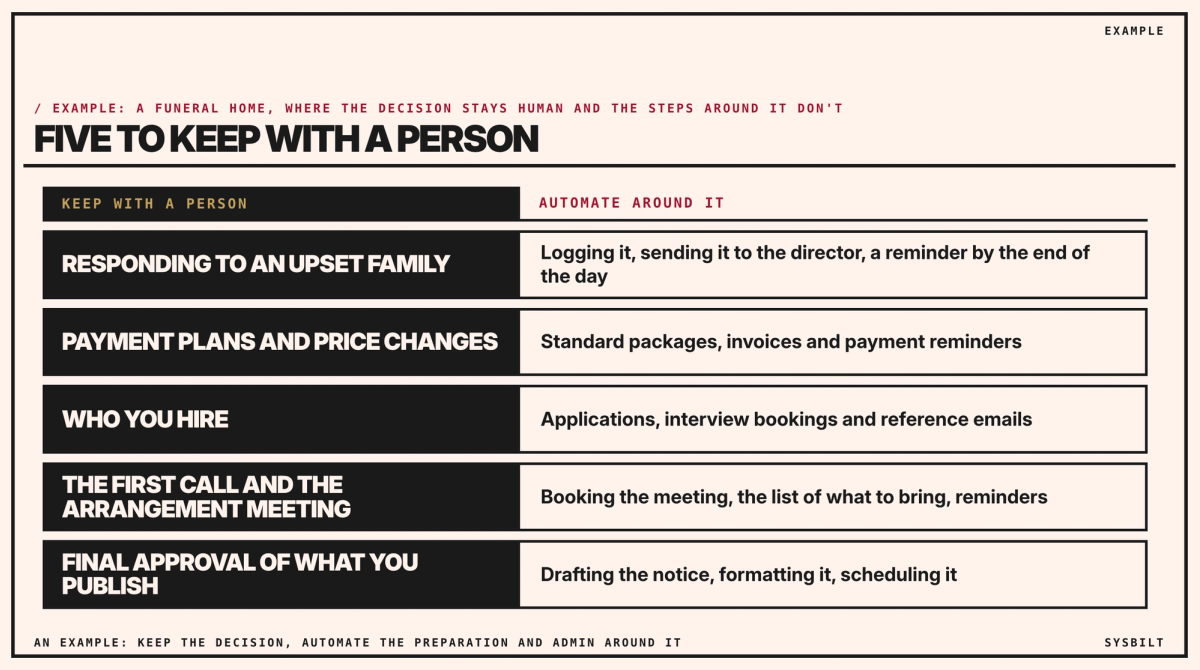
Keep five things with a person: how you respond to an upset family, price exceptions such as payment plans, who you hire, the first call and arrangement meeting, and final approval of anything you publish. Automate the steps around each, such as logging, scheduling, reminders and drafts. If a mistake would cost trust or money, a person decides.
Automate the steps, not the judgement
Most firms should automate more than they do: reminders, routing, scheduling and copying details between systems. The mistake is the other way round, automating a moment that needs judgement. The damage is quiet: an upset family, a poor hire, a notice with the wrong date.
The government's National AI Centre gives the same advice for AI: the higher the stakes, the more a person checks, up to a person reviewing every high-stakes decision (National AI Centre).
The five to keep with a person
When a family is upset
A system can log the complaint, send it to the funeral director and remind them if it isn't answered by the end of the day. How you respond, and what you offer, is a person's call. In Victoria, the itemised statement you give each family must already say how to complain (Consumer Affairs Victoria), so log complaints the way that procedure says.
Payment plans and price changes
Standard packages, invoices and payment reminders can run on their own. A family asking for a payment plan, a change to a package or help with the cost needs someone who can say yes. Prices have rules of their own: Consumer Affairs Victoria sets requirements for funeral providers' price lists, itemised statements and prepaid funerals (Consumer Affairs Victoria). An automation can draft the itemised statement from your price list; a person signs off any change.
Who you hire
Automate collecting the applications, booking the interviews and sending the reference emails, but not screening or ranking the applicants: software that sorts people can discriminate without anyone meaning it to, which is why the Australian Human Rights Commission publishes a compliance checklist for employers using AI in recruitment (Australian Human Rights Commission). Who joins a team of 12 is a decision about trust, and it stays with you.
The first call and the arrangement meeting
The first call is a person, day or night. After it, booking the arrangement meeting, sending the list of what to bring and the reminders can all be automated. The meeting itself is where a family decides what matters to them, so it stays human. Our post on after-hours phone answering compares a person and AI at night. For a funeral home, choose the person: someone on call, or an answering service whose receptionists put the call straight through.
What you publish
Drafting a death notice, formatting it for the newspaper and scheduling a post can be automated. A person checks every name, date and spelling, and the family approves it before it goes out.
What automating looks like after an arrangement meeting
Automating doesn't mean a robot. It means the rules and templates in the software you already use, such as your funeral management software and Xero, plus a connector app for the steps between them. A connector app, such as Make or Zapier, watches one app and does a step in another: when you mark an arrangement signed, it emails the florist the name, the date and the venue. Their paid plans start at about A$13 and A$29 a month, paid yearly (US$9 and US$19.99 at the Reserve Bank's rate on 6 November; prices checked 7 November 2026). If you run the office from spreadsheets, both work with Google Sheets and Excel too.
To find out whether your funeral software connects, search for its name in the app lists on Make's and Zapier's websites. If it isn't there, ask its support: "Does it connect to Make, Zapier or Xero?"
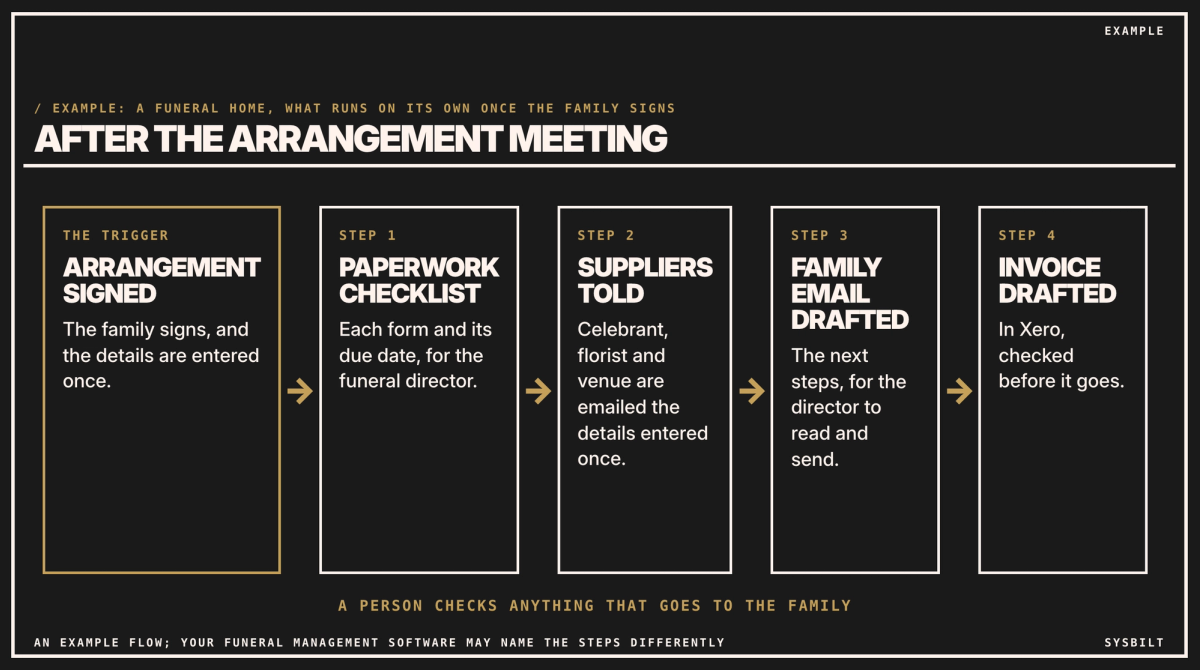
Here's what can run on its own once a family signs the arrangement:
- 01A checklist of the paperwork, with each due date, appears for the funeral director.
- 02The celebrant, florist and venue are emailed the details they need, from what you entered once.
- 03The family's next-steps email is drafted, for the funeral director to read and send.
- 04The invoice is drafted in Xero, and checked before it goes.
If the details change, change them once, in your software, and let the automation pass the change on. Make and Zapier can email a named person when a step fails, so choose who that is. Nothing urgent, such as a call at 2am, should depend on an automation.
Keep family details safe
- Send only what each step needs. A florist needs a name, a date and a venue, not the family's story.
- Keep medical details in your funeral software, such as the cause of death, not in a connector app. The Privacy Act doesn't cover people who have died (OAIC), but in Victoria the Health Records Act does: it binds any business that holds health information, and it keeps protecting a person's health information for 30 years after they die (Health Records Act 2001, section 95).
- Add a line to your privacy policy saying details may be stored overseas, because Make keeps data in the US or the EU, and Zapier in the US.
Five questions for everything else
- 01Is it mostly repetition, or mostly judgement? Repetition, automate it. Judgement, automate the steps around it and keep the decision.
- 02What happens if it's wrong? If the harm would be to your reputation, or legal, financial or emotional, keep a person in the loop.
- 03Is it more exceptions than rules? Then automate the set-up, not the final call.
- 04Does trust matter in that moment? Then a person owns the outcome, even if the system does the steps.
- 05Will it really save time, or just move the work? If someone still has to fix its mistakes later, don't.
To answer the fifth, count what the work costs now: our post on the real cost of not automating, under Related articles at the end of this page, shows how to tally it in a week.
Start this week
List everything your office does after an arrangement meeting, and tick the steps that are the same every time. Those are the first to automate. Our post on the first three tasks to automate shows where most service businesses start.
If you'd rather have it set up, we automate the admin around these moments and leave the decisions with your team. That's part of our Automation service.
If you'd like a second pair of eyes, book a 15-minute call with our team in Sydney, by phone or video. Bring the tasks you'd most like off your desk, and we'll tell you which are safe to automate and which to keep, so you leave knowing what to start with. There's no obligation after the call, and we don't upsell.
See how we fix this
See the exact system we build to fix this
Show me what we should automate and what should stay human
WRITTEN BY
Felipe Chaparro
Systems Architect and Founder of SYSBILT. Felipe engineers custom automation, AI workflows, and performance web architectures for scaling Australian service businesses.