Stop manual data entry between Xero and HubSpot: what HubSpot's Xero sync does, where it stops, and which setup fits the way you bill.
In this article
Every booking your team wins in HubSpot gets typed again into Xero: the client, the event, the deposit invoice and, weeks later, the balance. Then someone in sales asks finance whether the deposit has landed, and finance looks it up.
Here's how to stop manual data entry between Xero and HubSpot: what HubSpot's own Xero sync does, where it stops, and which setup fits the way you bill.
The short answer
To stop manual data entry between Xero and HubSpot, decide which system owns each record, clean up duplicate contacts, then connect them with HubSpot's Xero Data Sync, so invoices and payments show in HubSpot. If you bill in Xero and want each won deal to start a draft invoice, add a connector app, because the sync won't send drafts.
What double entry costs you
Retyping is slow, but the bigger cost is the mistakes. In an Ipsos survey of over 500 accountants and finance decision-makers at Australian SMEs for OFX, a company that sells business payments, 38% named errors from manual data entry as their most common inefficiency in payments (October 2025).
For an events company, those errors look familiar. A deposit invoice goes out late because nobody copied the deal across. The same client exists twice, once from the enquiry form and once from Xero. Sales can't see who has paid, so a client gets chased for a deposit they paid last week.
Decide who owns what
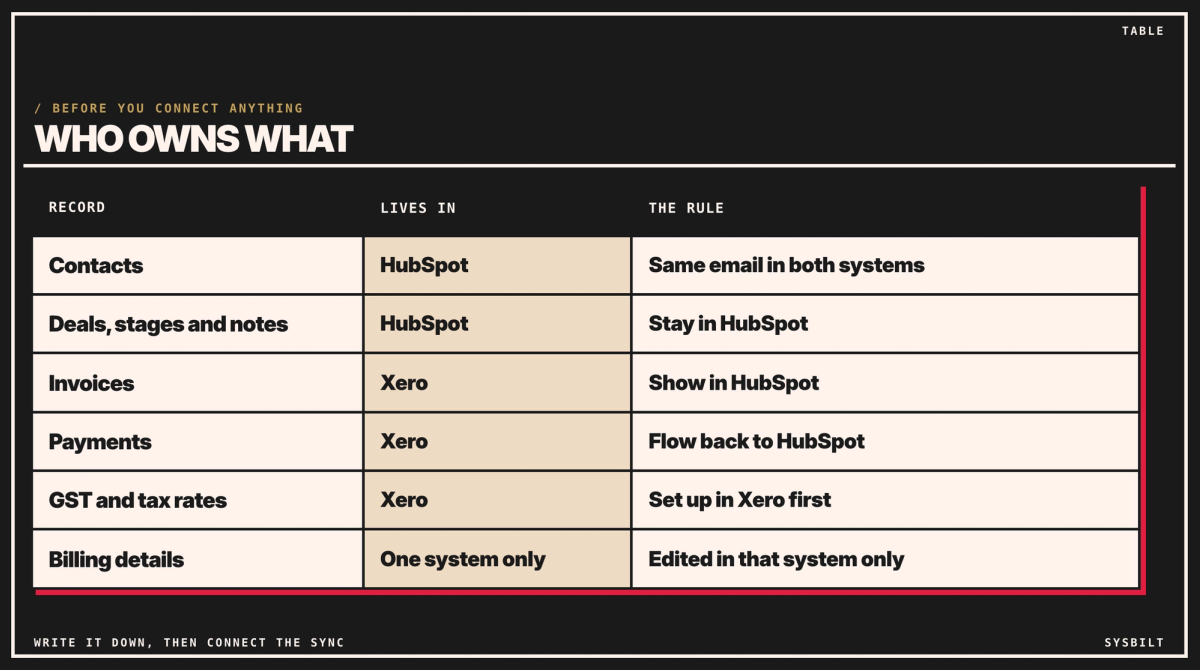
Before you connect anything, write down which system owns each kind of record. Without that rule, a sync just copies mistakes faster.
- HubSpot owns the sales side: contacts, deals, stages, notes and quotes.
- Xero owns the money: invoices, payments, GST and tracking categories.
- Billing details live in one system only: the billing address, billing email and payment terms. Pick one, and make it the only place they're changed. HubSpot can stop people editing a field only on its Enterprise plans (HubSpot), so for most teams this is a rule you write down and share.
Then clean up duplicates, once, before you connect anything. Export both lists first, because a merge is hard to undo. Match people on their email address and companies on their ABN, merge the doubles, and decide who's allowed to create new contacts. If HubSpot doesn't hold ABNs yet, add a field for them first, or match companies on their exact name. The ABN is only for this clean-up: from then on, Data Sync matches contacts on their email address (HubSpot), so give each client's billing contact the same email in both systems.
What HubSpot's Xero sync does, and where it stops
HubSpot's own Xero app, called Data Sync, comes with HubSpot's plans, including its free one, so it costs nothing extra. It connects four kinds of record (HubSpot):
- Contacts, one way or both ways.
- Products, which Xero calls items, one way or both ways.
- Invoices, from Xero to HubSpot, or both ways.
- Payments applied to invoices, from Xero to HubSpot, or both ways.
Three limits matter most for billing, all from the same HubSpot page:
- Drafts don't sync. An invoice has to be open, not draft, before it goes to Xero.
- Invoices made in HubSpot must be edited in HubSpot. Change one in Xero and it fails to sync, so the two systems no longer match. Invoices made in Xero can be edited in Xero.
- Tax rates come from Xero. Set up your GST rates in Xero before you turn on invoice sync, because rates created in HubSpot don't go to Xero.
And four for whoever sets it up:
- Turn off HubSpot's card-fee setting, because the fee doesn't sync to Xero.
- Only payments made after you connect come across, which stops old payments turning into duplicates. Part payments show against their invoice.
- Quotes don't sync (HubSpot Marketplace), and neither do invoices that use HubSpot's automated sales tax.
- Contact names must be unique in Xero, so a HubSpot contact with the same name as an existing Xero contact won't sync until you rename it.
An example: one booking
Here's one made-up booking: a $40,000 conference package, with a 30% deposit, the balance due after the event, and a purchase order number from the client.
- Sales marks the deal as Booked in HubSpot and adds the PO number to it.
- The deposit invoice, $12,000, is made in Xero with the PO number in the invoice's Reference field, where clients expect to see it. Data Sync then shows the invoice in HubSpot, and when the client pays, the payment shows too, so nobody has to ask finance.
- The balance invoice, $28,000, follows the same path after the event. One deal can carry both invoices.
Who types the deposit invoice is the real choice. Finance can make it in Xero by hand, or a connector app can draft it the moment the deal is Booked, copying the PO number from the deal into Reference, with no extra HubSpot plan needed. If you bill from HubSpot instead, the PO number needs a custom mapping to reach Xero, which takes a paid plan, covered below.
Which setup fits the way you bill
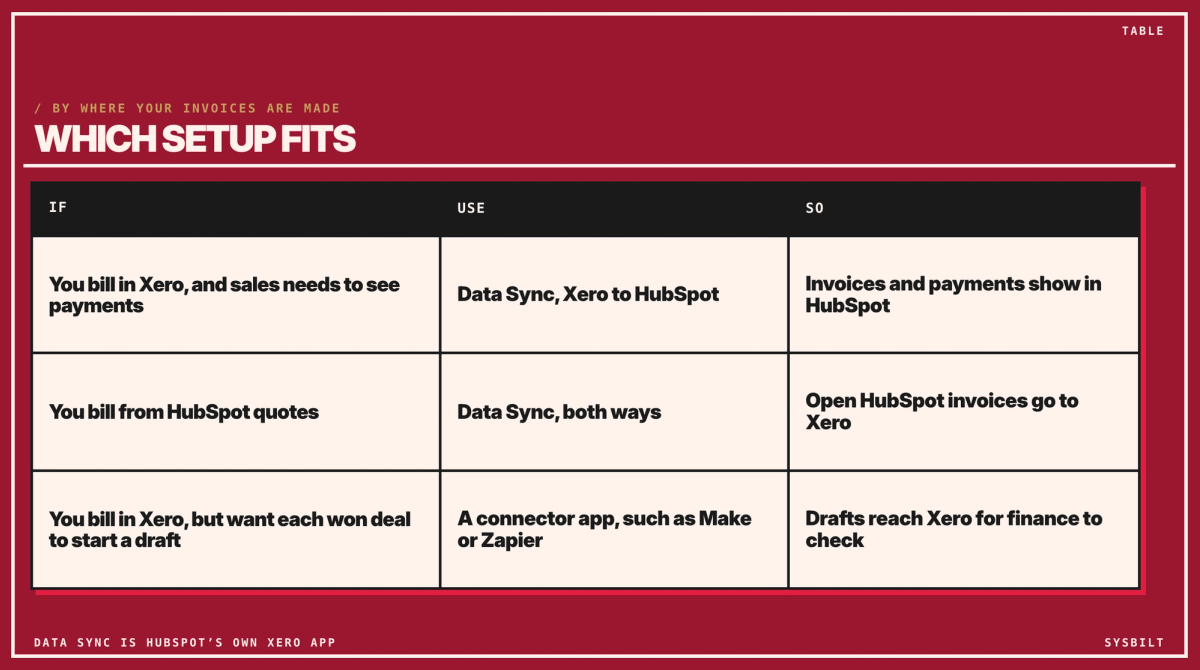
Most of the choice comes down to where your invoices are made.
You bill in Xero, and sales needs to see payments
Use Data Sync with invoices and payments flowing from Xero to HubSpot. Finance keeps invoicing in Xero as now, and sales can see what's been invoiced and paid without asking. When an invoice is overdue, the reminders our post on automating overdue invoice emails describes still go from Xero.
You want to bill from HubSpot
Use Data Sync with invoices both ways. Sales turns a deal or quote into an invoice in HubSpot, and once it's open, it goes to Xero with the tax rates you set up there. Make every change to those invoices in HubSpot.
Your own fields need a paid plan here. A mapping decides which field in one system fills which field in the other. HubSpot sets up the common ones, and adding your own, such as a purchase order number, needs at least Data Hub Starter. HubSpot lists Data Hub Starter at US$20 (about A$29) a seat a month, with a new-customer offer from US$7 (checked 7 November 2026, HubSpot), so check whether your subscription already includes it. Australian dollars in this post are at the Reserve Bank's rate on 6 November (A$1 = US$0.69).
You bill in Xero, but want each won deal to start the invoice
This is the gap Data Sync leaves, because it won't send a draft. A connector app, such as Make or Zapier, watches for something to happen in one app and then does a step in another. Here, when a deal reaches a stage such as Booked, it creates a draft deposit invoice in Xero, with the PO number, for finance to check, and when the invoice is paid, it updates the deal in HubSpot. A second step can draft the balance invoice once the event is delivered. It's built once by someone who sets up automations, and a company your size fits within either starting plan. Make starts at US$10.59 (about A$15) a month for 5,000 credits, or US$9 (about A$13) a month paid yearly. Zapier starts at US$29.99 (about A$43) a month for 750 tasks, or US$19.99 (about A$29) a month paid yearly. Both have a free plan to test with. Prices checked 7 November 2026, so they may have changed.
The two can run together: let Data Sync bring invoices and payments into HubSpot, and use the connector app only to create the drafts in Xero, so nothing is done twice. If anything fails, the connector app should create a task for a person rather than fail quietly, so a booking never goes uninvoiced.
What it costs
- Data Sync: nothing extra.
- Data Hub Starter, only if you bill from HubSpot and need your own fields, such as the PO number: about A$29 a seat a month at list price.
- A connector app, only for drafts from deals: from about A$13 a month for Make or about A$29 for Zapier, both paid yearly.
- The setup: a day of clean-up before you connect anything, then the connection itself, which is quick once the data is clean.
Set it up in five steps
- 01Clean up duplicates in HubSpot and Xero, matching people on email and companies on ABN, and give each billing contact the same email in both. Plan a day for this before you connect anything: it's the bigger part of the job, and connecting the sync is quick once the data is clean.
- 02Write down who owns what, in plain words, and share it with sales and finance.
- 03Set up your tax rates in Xero, and turn off HubSpot's card-fee setting. Finance owns this step, along with tracking categories, the tags Xero uses to report by event type or region.
- 04Connect Data Sync in order: contacts first, then products, then invoices and payments, because Xero needs the contact and the products to exist before an invoice can sync (HubSpot).
- 05Give the sync one owner, usually whoever runs HubSpot, who checks for new duplicates each week and approves any change to the mappings.
If you're still choosing a CRM, our HubSpot vs Pipedrive comparison covers how each one works with Xero.
We set this up for businesses like yours, from the duplicate clean-up to the sync and a connector app where you need one. That's part of our Automation service.
If you'd like a hand, book a 15-minute call with our team in Sydney, by phone or video. Bring a list of the fields your team retypes, and we'll tell you which setup fits, so you leave knowing what to connect first. There's no obligation after the call, and we don't upsell.

WRITTEN BY
Felipe Chaparro
Systems Architect and Founder of SYSBILT. Felipe engineers custom automation, AI workflows, and performance web architectures for scaling Australian service businesses.