
How to connect Stripe to Xero automatically: a pay-now button on invoices, Xero's Stripe feed and a sync app for high volume, with fees and GST.
In this article
Your website took 31 orders yesterday, and this morning Stripe paid out one amount that matches none of them. Multiply that by a week, add the stockists who pay their invoices by card, and your bookkeeper loses most of Monday to matching.
Here's how to connect Stripe to Xero automatically, in the order most businesses need it: a pay-now button on invoices, Xero's Stripe feed for online sales, and a sync app once the volume gets high, with the fees and GST explained.
The short answer
To connect Stripe to Xero automatically, add Stripe as a payment service so your invoices get a pay-now button, then turn on Xero's Stripe feed so every payment, fee and payout lands in a Stripe account in Xero. Above about 500 online sales a month, a sync app that posts one summary per payout saves the most time.
Why Stripe payouts don't match your sales
Stripe doesn't send each payment to your bank on its own. It adds up the day's payments, takes off its fees and any refunds, and pays out the total, so one deposit covers many sales. The payout also arrives later than the sale: some lower-risk Australian businesses are paid out in 2 days, and a new account's first payout can take 7 to 14 days (Stripe).
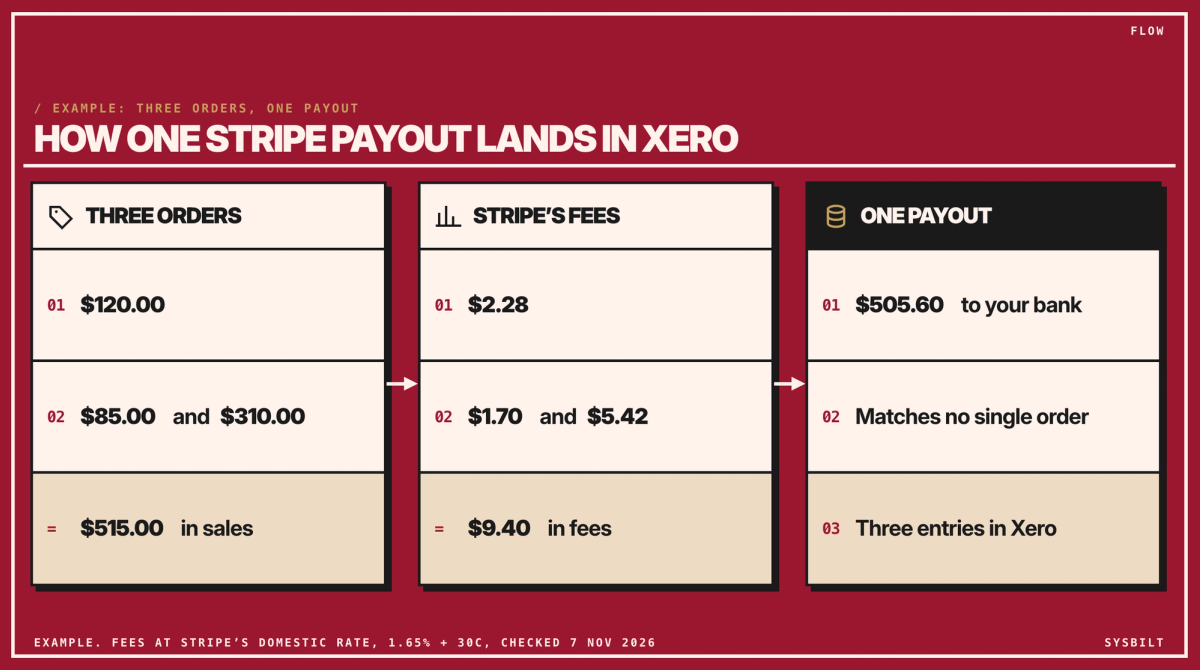
Here's an example with three orders. The numbers are made up, but the fees are Stripe's domestic card rate of 1.65% plus 30 cents:
- Orders: $120.00, $85.00 and $310.00, so $515.00 in sales.
- Fees: $2.28, $1.70 and $5.42, so $9.40 in fees.
- Payout: $505.60 arrives in your bank, which matches none of the three orders.
Xero needs three entries for it: the $515.00 of sales at their full amount, the $9.40 of fees as an expense, and the $505.60 payout as money moving to your bank. Miss one, and your sales and your GST will both be wrong.
Three ways to connect Stripe to Xero
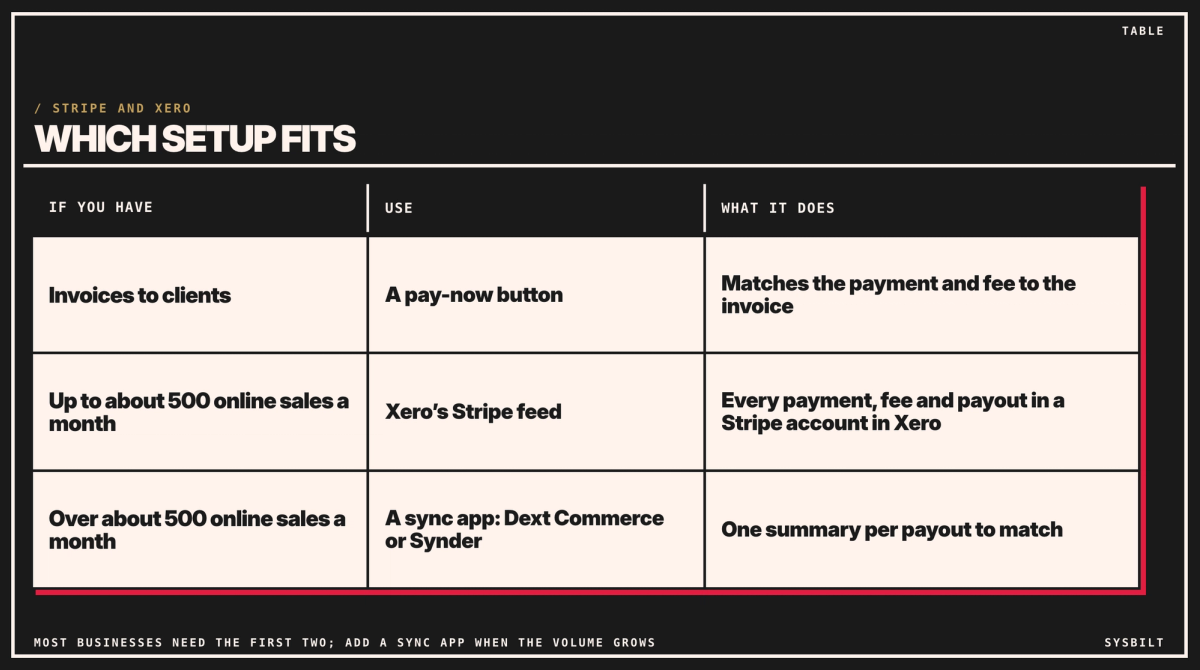
Most businesses need the first two, and a sync app takes over from the feed once online sales pass about 500 a month.
At about 900 orders a month
Start with a sync app for your website's sales, and add the pay-now button for stockists who want to pay online.
01A pay-now button on your invoices
For stockists and other clients you invoice, add Stripe as a payment service in Xero and choose it on your invoice template. Each invoice then gets a Pay now button, and the client can pay by card without a Xero login (Xero). When they do, Xero matches the payment and Stripe's fee to the right invoice (Xero).
Stockists who pay by bank transfer don't need Stripe at all: the money lands in your bank account, and your bookkeeper matches it to the invoice in Xero as usual. For those who'd rather pay online, the invoice can also offer PayTo through Stripe, a way to pay straight from their bank account. Stripe charges 1% plus 30 cents for it, capped at $3.50, against 1.65% plus 30 cents for a domestic card (Stripe), so on a $4,000 invoice it's $3.50 instead of $66.30. A pay-now link also helps your reminders work, as our post on automating overdue invoice emails explains.
02Xero's Stripe feed, for online sales
Your website's sales don't come through Xero invoices, so the payment service can't match them. For those, turn on Xero's Stripe feed. It adds a Stripe account to Xero, which isn't a new Stripe login: it's a separate account inside Xero, like a bank account for the money Stripe is holding for you. The feed imports every payment, fee, refund and payout made after it's connected, so it won't double up anything you've already reconciled (Xero). Older transactions can be imported from a Stripe file. Your bookkeeper then reconciles each line against the sale, instead of untangling a bank deposit.
Set it up the same way every time:
- Sales go to your sales account at their full amount, with Xero's GST on Income tax rate. Orders you ship overseas are usually GST-free exports (ATO), so they need a GST-free rate instead, or your BAS will show GST you don't owe. Ask your accountant which rate to use.
- Fees go to an expense account such as Merchant fees, which your bookkeeper creates once, with the tax rate GST on Expenses, one of Xero's standard rates. Stripe's fees include GST, so that's how the GST on them is claimed back on your BAS. It's the line most often coded wrong, so ask your accountant to confirm it once.
- Payouts are a transfer. In Xero, a transfer moves money between two of your own accounts, here from the Stripe account to your bank account, so it isn't counted as a sale a second time.
- Refunds are matched to the sale they reverse.
Bank rules in Xero, saved instructions that code a line the same way every time, can then handle the fee and payout lines for you: a spend money rule for the fees, and a transfer money rule for the payouts (Xero). This works well up to about 500 online sales a month.
03A sync app, for high volume
At around 900 orders a month, reconciling every line still takes hours. A sync app posts your Stripe sales, fees and refunds to Xero in summary, for example one entry per payout, with the fees and GST already coded, so there's one line to match for each deposit. It replaces the Stripe feed for your website's sales rather than sitting on top of it, so switch the feed off when you start, or the same sales come in twice. Two on the Xero App Store work with Stripe:
- Dext Commerce: Starter at US$19 (about A$28) a month for 200 transactions, or Growth at US$59 (about A$86) for 1,000 (Dext Commerce).
- Synder: Basic at US$52 (about A$75) a month for up to 500 sales, or Essential at US$103 (about A$149) for up to 3,000 (Synder). It suggests its summary option above 500 transactions a month.
Prices are for paying monthly, checked 7 November 2026, so they may have changed. Australian dollars are at the Reserve Bank's rate on 6 November (A$1 = US$0.69). At about 900 sales a month, that's Dext Commerce's Growth plan, at US$59, or Synder's Essential plan, at US$103. Both offer a trial, so run one alongside your current process for a month you've already reconciled, and keep the one whose summaries your bookkeeper finds easier to check.
Check one thing first: in Xero, look under Sales for invoices from your website. If each order is already there, something is sending them, so pick one route for each sale, that or the app, never both. And if your website runs on Shopify Payments, your payouts come from Shopify rather than your own Stripe account, so look for an app that reads Shopify's payouts instead.
Card fees, now that surcharges are gone
From 1 October 2026, you can't add a surcharge to payments on eftpos, Mastercard or Visa cards (RBA). The Reserve Bank also cut the caps on the interchange fees behind domestic card payments from the same date, which should lower what businesses pay over time.
So the card fee is now a cost of every sale. On Stripe's domestic rate, a $120 order costs $2.28 to take, and the fees on a month of online sales are worth a line in your pricing. Check your margins with the fee included, and steer large invoices to PayTo or direct debit.
What changes on Monday
Before, your bookkeeper matches each payout by hand against dozens of orders, then fixes the fees and GST. After, each payout is one summary line to match, with the fees and GST already coded, and stockist card payments are matched to their invoices as they come in. Your bookkeeper does the setup in Xero and Stripe; you decide which payment options stockists get and whether a sync app is worth paying for.
What to set up first
- 01Add Stripe as a payment service in Xero and choose it on your invoice template, with PayTo for large invoices.
- 02Turn on the Stripe feed and create the Merchant fees account, coded GST on Expenses, with your accountant's OK.
- 03Treat every payout as a transfer to your bank account, and add bank rules: spend money for the fee lines, transfer money for the payouts.
- 04Put payouts in your cash forecast in the week they land, not the day of the sale. Our post on projecting cash flow 90 days out shows how.
- 05Above about 500 online sales a month, trial a sync app on a month you've already reconciled, then switch the feed off for website sales.
Your bookkeeper can set up the first three steps in an afternoon. A sync app takes longer, so allow a month of running it alongside your current process. We set up the whole flow for businesses like yours, from the payment service to the feed rules and a sync app if you need one. That's part of our Automation service.
If you'd like a hand, book a 15-minute call with our team in Sydney, by phone or video. Bring last month's Stripe payouts and your order count, and we'll tell you which setup fits, so you leave knowing what to switch on first. There's no obligation after the call, and we don't upsell.

WRITTEN BY
Felipe Chaparro
Systems Architect and Founder of SYSBILT. Felipe engineers custom automation, AI workflows, and performance web architectures for scaling Australian service businesses.