What a cheap website really costs an Australian business: prices up front, monthly fees, the enquiries it loses, and when a custom build pays off.
In this article
A cheap website feels finished the week it goes up. The pages are there, the logo is in the header, and having a website looks done. The cost shows up later, in the visitors who don't trust it and ring someone else, and in the fixes and the rebuild that can follow. Here's what each option costs in Australia, and how to tell whether a cheap site is costing you more than a custom build would.
The short answer
In Australia, a website you build yourself costs from about $18 a month on a builder, a site from a developer about $2,500 to $5,000, and a custom build by an agency from about $15,000. The true cost of a cheap site is the enquiries it doesn't win, plus any fixes and rebuild.
Cheap website vs custom build: what each costs in Australia
We build websites ourselves, so these figures come from the builders and from Airtasker's price guide, not from us. They're the best Australian figures we could find: there's no government guide to website prices, and most others are agencies' own price lists. Airtasker's come from a marketplace, so treat them as indicative, and all of them as rough ranges in Australian dollars. Check whether a quote includes GST. Hosting, in the last column, is what keeps a site online.
| Option | Who builds it | Up front | Each month |
|---|---|---|---|
| A website builder | You, on a platform such as Wix or Squarespace | Up to about $1,000 if you get a little help | About $18 to $40 for a business plan, hosting included |
| A site from a developer | A freelance developer or a small studio | About $2,500 to $5,000 | Hosting from about $3 to $19 |
| A custom build | An agency | About $15,000 to $20,000 for a simple site, and $40,000 to $75,000 or more for a larger one | Hosting and support, quoted separately |
The monthly plan prices are from Squarespace and Wix on 6 November 2026, with GST included. The other figures are from Airtasker's Australian price guide, last updated in December 2023.
If a freelancer set your site up on Squarespace or Wix, it sits in the first row. The real difference between the rows is who does the work. On a builder, you write the words, choose the photos and set up the forms. With a developer or an agency, you're paying for that work, and with a custom build, for a site planned around how your clients get in touch.
When a cheap website is enough
A website builder makes sense when you're starting out, most of your work comes by referral, and the site's job is to confirm you exist. On a builder, you can fix the first line, the button and the photos yourself, without paying anyone. A custom build earns its cost when the site has to win enquiries from people who don't know you yet: from search, from ads, from your Google listing or from Instagram.
The cost you don't see: the enquiries it doesn't win
The build is the number on the invoice. The bigger number is the enquiries a page doesn't win. You can work it out with your own figures: your visits a month, which your builder's analytics page shows, the share of visitors who enquire, the share of those who become clients, and what a client is worth.
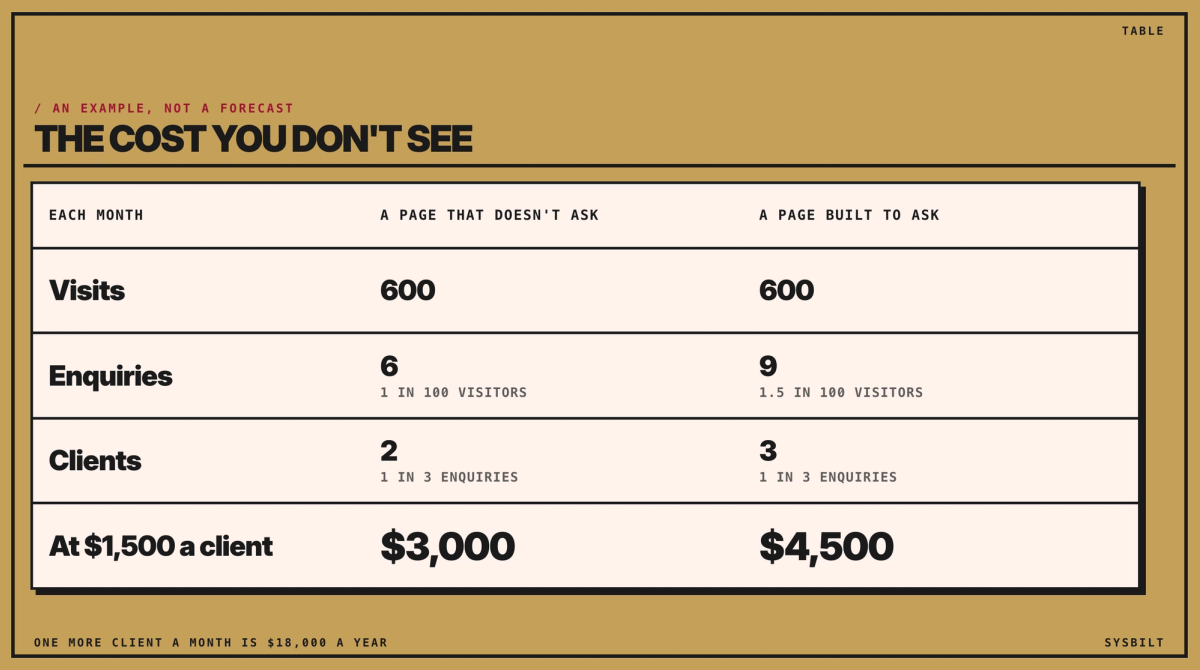
For example, take a site with 600 visits a month. If 1 in 100 visitors enquires, and 1 in 3 of those becomes a client worth $1,500, the site brings in 2 clients, or $3,000, a month. If a better page lifted enquiries to 1.5 in 100, it would bring in 3 clients: $1,500 more a month, or $18,000 a year. Those numbers are made up, but the sum works the same way with yours, and if your clients are worth more, so is the gap.
A cheap site can cost more later, too: the add-ons and fixes it needs along the way, and if it has to be replaced, a second build.
What visitors notice first
You may have seen that 75% of people judge a business by its website's design. That stretches a 2002 Stanford study, but its main finding holds: the look of a site was what people mentioned most, in nearly half of their comments.
They decide fast, too. Nielsen Norman Group found in 2011 that people often leave a page within 10 to 20 seconds, unless it quickly shows what it offers. So the first line has to say what you do, who it's for and where. "Welcome to our website" spends that time saying nothing.
What a template usually ships
A theme, stock photos and your logo in the header. The words often still read as if they were written for another business.
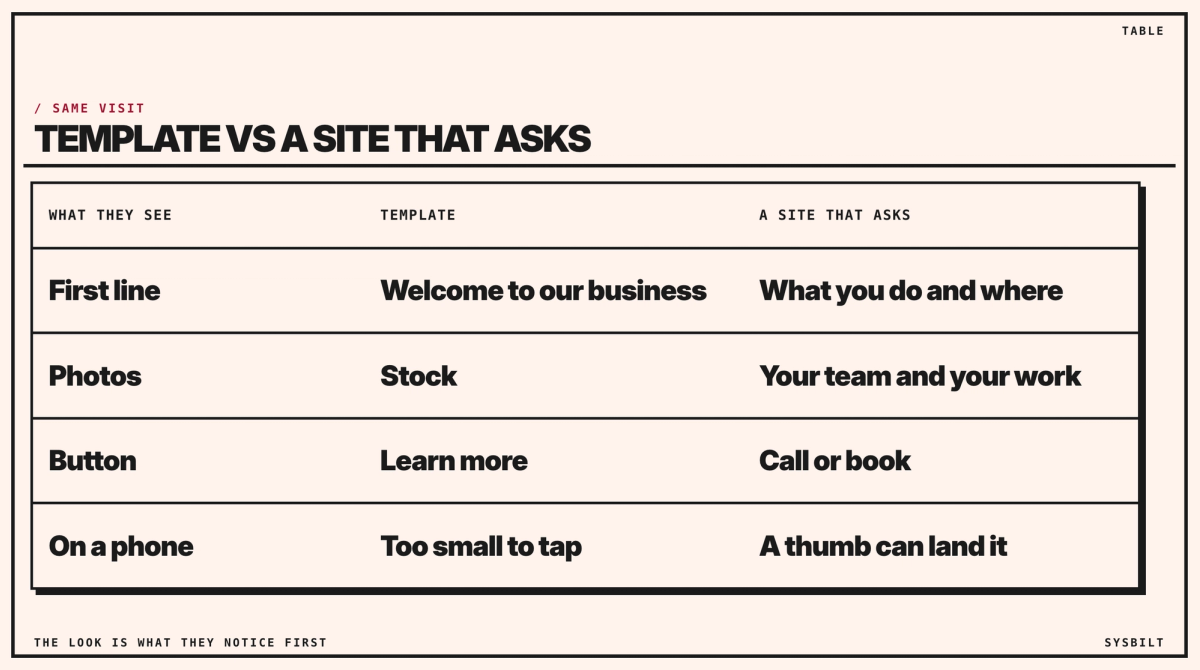
- The button says "Learn more", and there's no clear way to call, book or ask.
- On a phone, buttons are too small to tap. The accessibility guidelines set a minimum size for anything you tap. Your thumb is the quick test: if you hit the wrong link, so will your visitors.
- Add-ons pile up. Plugins, or extensions on some builders, bolt on extra features such as a form or a gallery. Each one adds weight, and a heavy page loses visitors before it loads. Whoever set up your site can tell you which ones it uses.
Five checks on your phone
You don't need a web developer for the first look.
- 01Test the speed. Open PageSpeed Insights at pagespeed.web.dev, paste your address and choose Mobile. Look for the number called Largest Contentful Paint, which is how long the main content takes to appear: good is 2.5 seconds or less. Our guide to how fast a website should load walks through the screen.
- 02Open the site on your phone. You should be able to read it without zooming, and tap the call button without hitting the link beside it.
- 03Read the first sentence out loud. It should say what you do, who it's for and where.
- 04Count the ways to get in touch. If the only button says "Learn more", the page isn't asking for the enquiry, one of the reasons a website doesn't get calls.
- 05Know your own numbers. Your builder's analytics page shows your visits a month. Set them against the enquiries the site brought in, and you have the figures for the sum above.
If two or more of the first four fail, the site is probably costing you enquiries.
Our Websites & E-commerce service covers business websites, not just online shops, and we connect each one to your CRM, the system that holds your client list, so the enquiries it wins don't get lost.
Book a 15-minute call with our team in Sydney, by phone or video, and we'll look at the site you have with you. We don't upsell, and we'll tell you honestly whether it's worth fixing, rebuilding or leaving as it is.
See how we fix this
See the exact system we build to fix this
Show me what a website that converts looks like
WRITTEN BY
Felipe Chaparro
Systems Architect and Founder of SYSBILT. Felipe engineers custom automation, AI workflows, and performance web architectures for scaling Australian service businesses.