How fast your website should load on a phone, the three numbers Google measures, how to test yours in a minute, and what to fix first.
In this article
A business website should load its main content within 2.5 seconds on a phone. That's Google's line for a good experience, and it's measured on real visits, not on a test in the office. The slower a page gets past that line, the more people leave before they see your number or your form, and if you pay for ads, you've paid for those clicks too.
The short answer
Your website's main content should appear within 2.5 seconds on a phone. Google also checks that a tap gets a response within 200 milliseconds and that the page barely moves while it loads. You can test any page in about a minute with Google's PageSpeed Insights.
How fast is fast enough for a business website?
Google measures speed with three numbers it calls Core Web Vitals. If you only remember one, make it the first: the main content should appear within 2.5 seconds. Google judges this on real visits, not on one test, and a page passes when three out of four visits are good.
Here's the full picture, for you and whoever looks after your site:
| What Google measures | Google's name | Good | Needs improvement | Poor |
|---|---|---|---|---|
| When the main content appears | Largest Contentful Paint | 2.5 seconds or less | Up to 4 seconds | Over 4 seconds |
| How long a tap or click waits for a response | Interaction to Next Paint | 200 milliseconds or less | Up to 500 milliseconds | Over 500 milliseconds |
| How much the page jumps while it loads | Cumulative Layout Shift | 0.1 or less | Up to 0.25 | Over 0.25 |
The second, Interaction to Next Paint, asks for a response within a fifth of a second. It replaced an older measure, First Input Delay, in March 2024.
Does a faster site rank higher on Google?
It can help, but it won't carry a page on its own. Google recommends good Core Web Vitals and says they align with what its ranking systems reward, but it still shows the most relevant page when the page experience is poor. Speed helps most when several pages answer the search equally well.
How to check your website's speed
You don't need a web developer for the first look.
- 01Open PageSpeed Insights at pagespeed.web.dev and paste the address of a page. Start with the one your ads or your Google listing send people to, and if you have a page for each location, test each one.
- 02Choose Mobile. It's the stricter of the two tests.
- 03Read the top section first. "Discover what your real users are experiencing" shows the three numbers from real visits in Chrome over the last 28 days, and whether the page passes. Write down the Largest Contentful Paint.
- 04If it says "No Data", use the lab test below it. That isn't a fault. It means Google doesn't have enough visits from Chrome users to report on. The lab test, "Diagnose performance issues", loads the page on a simulated mid-range phone over a slow 4G connection. Write down its Largest Contentful Paint.
- 05Look past the score in the circle. It sums up the lab test, while Google Search looks at real visits, so the numbers tell you more.
What your result means
Under 2.5 seconds: look past speed
Your page is fast enough. If calls and forms still don't come, the problem is further along: what the page says, how easy it is to get in touch, or what happens to the enquiry afterwards. Tracking your calls shows whether the page is bringing them.
Between 2.5 and 4 seconds: start with the photo
The three fixes below can bring a page under the line without a rebuild.
Over 4 seconds: Google rates it poor
Start with the same fixes, because they help at the edges. If they barely move the number, the limit is the way the site is built: its theme, its plugins or the builder it sits on. That's when a rebuild is worth getting quoted.
What slows a business website down
Most of the wait comes from three places: the main photo, the extras that load with the page, and the server that sends it. Whoever looks after your site, whether that's your web developer, your agency or your host, can check all three.
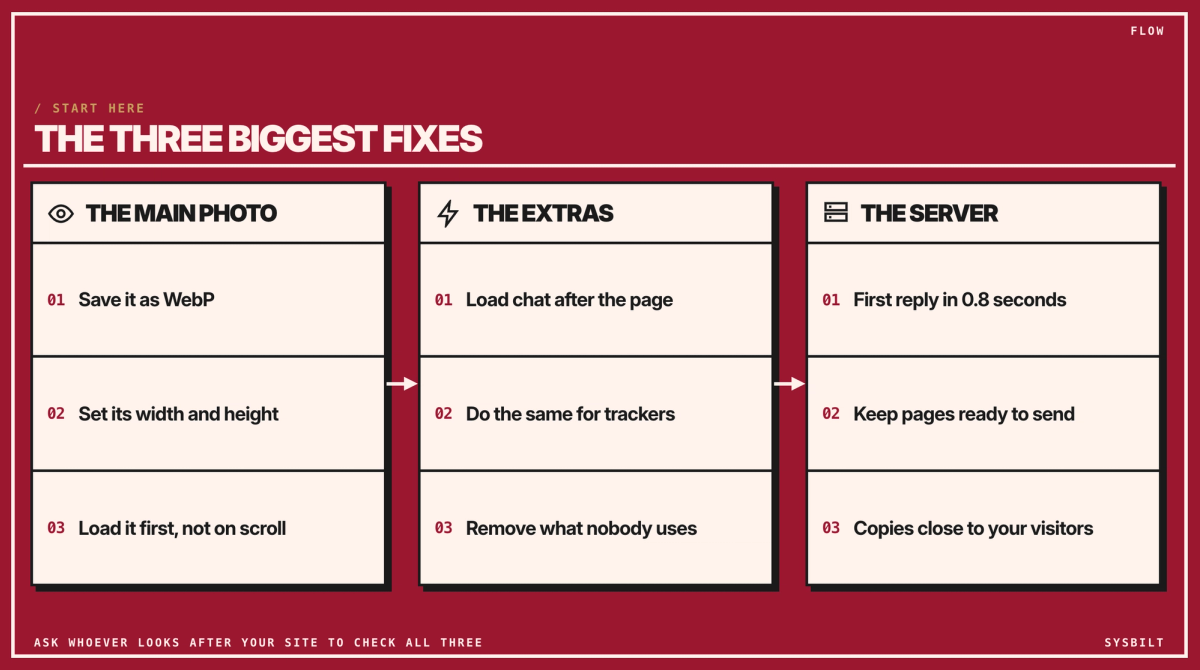
- 01The main photo. If your page opens with a large photo, that photo is usually the main content Google times, so it's what people wait for. Saved as WebP, a newer image format, the file is usually 25 to 34% smaller than a comparable JPEG at the same quality, so the photo doesn't have to look any worse. Ask for its width and height to be set, so the page doesn't jump, and for it not to be lazy-loaded. Lazy loading waits until someone scrolls before fetching an image, which suits photos further down the page, not the first one.
- 02The extras. Chat widgets, booking pop-ups, trackers and embedded videos all compete with the page. Ask for them to load after the main content, and remove any that nobody uses. They're also what can make a tap feel slow.
- 03The server. Nothing appears until your server sends its first reply, and Google suggests that reply should take 0.8 seconds or less. If yours is slower, ask about caching, which keeps pages ready to send instead of rebuilding them for every visit, and a CDN, a network that keeps copies of your site closer to your visitors.
- 04Test again on a phone. Run the same mobile test after each change and compare the numbers, not the score.
Send this to whoever looks after your site. Fill in the gaps and paste it into an email. The technical words are for them, and every request comes from Google's own guidance, so it's a fair thing to ask.
Hi [name],

I tested [page address] with PageSpeed Insights on mobile. The main content (Largest Contentful Paint) took [number] seconds, and Google's mark for good is 2.5 seconds.

Could you check these three things and tell me what each would cost?
1. The main photo: saved as WebP, with its width and height set, not lazy-loaded, and loaded first (fetchpriority="high").
2. Chat, booking and tracking scripts: loaded after the main content, and any we don't use removed.
3. The server: a first response (TTFB) under 0.8 seconds, with caching or a CDN if needed.

Please send me the new mobile result once it's done.

Thanks,
[your name]
A good reply says which of the three they can fix, what each costs, and when you'll see the new result. If the only answer is a new website, ask for the fixes to be priced first.
If you look after the site yourself on a website builder, paste this into ChatGPT with a screenshot of your mobile result instead:
Here's my PageSpeed Insights mobile result for [your page address]. Explain in plain English what's slowing the page down, and list the three changes that would help most, in order. My website is built with [Wix, Squarespace, WordPress or another platform].What a slow page costs you
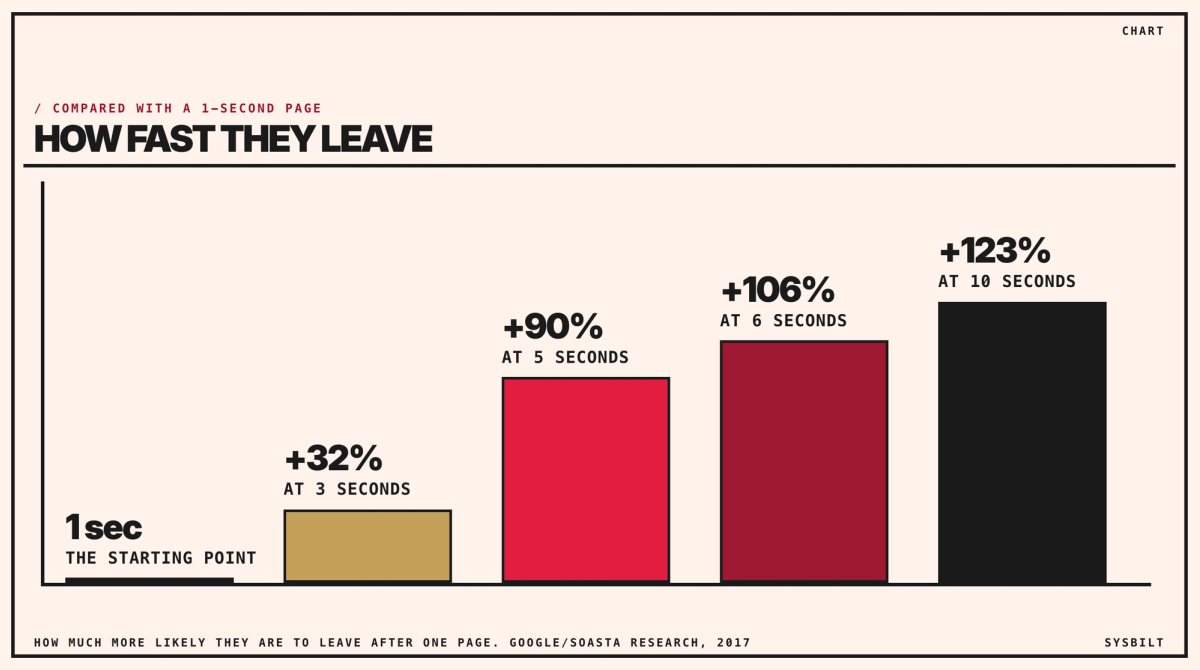
Google studied this with SOASTA, a web performance company, in 2017, and published the findings in 2018. On phones, as a page's load time goes from 1 second to 3 seconds, the chance that a visitor leaves after that one page rises by 32%. At 5 seconds it's 90% higher, at 6 seconds 106% higher, and at 10 seconds 123% higher. It's research across many sites, so read it as the direction, not a forecast for yours.
Even a tenth of a second shows up. Milliseconds Make Millions, a 2020 study Google commissioned from Deloitte, looked at 37 brands and 30 million mobile visits. When sites built to win enquiries got 0.1 seconds faster, 21.6% more of the people who started a form went on to send it, and retail sites turned 8.4% more visitors into buyers.
Vodafone ran a cleaner test, published on Google's web.dev in 2021. It split its visitors between two identical-looking versions of a page, one built to load faster. The faster one showed its main content in 5.7 seconds instead of 8.3 and made 8% more sales, even though 5.7 seconds still misses Google's 2.5-second line.
If you pay for Google Ads, you pay for every click, including the people who leave before the page loads. And for a practice, a firm or a builder, the sale is usually an enquiry: a call, a booking or a form. A slow page loses some of those before anyone sees your number.
Our Websites & E-commerce service covers business websites, not just online shops, and we connect each site to your CRM so the enquiries it brings don't get lost.
Book a 15-minute call with our team in Sydney, by phone or video, and we'll go through your PageSpeed result with you. We'll tell you honestly whether a few fixes will do, or whether a rebuild is worth it.

WRITTEN BY
Felipe Chaparro
Systems Architect and Founder of SYSBILT. Felipe engineers custom automation, AI workflows, and performance web architectures for scaling Australian service businesses.