
How to automate social media posting: what to hand to a tool and what to keep, the scheduling built in, and the hour a week that keeps it going.
In this article
You write an article for the website most months, about a planning scheme change or a project that won approval, and then it sits there. LinkedIn gets a post when you remember, Instagram when a project photo looks good, and the Facebook page hasn't posted since winter. Each post starts from a blank screen at nine at night.
Here's how to automate social media posting without it reading as automated: what to hand to a tool and what to keep, the scheduling the platforms already give you, when a scheduler or a workflow tool earns its place, and the hour a week that keeps it going. If you do one thing this week, schedule next week's posts in one sitting, in the tools you already have.
The short answer
Automate the publishing, not the judgement. Write a week of posts in one sitting and schedule them, using the platforms' own scheduling or one tool, and reply to comments yourself in two short windows a week. Add a workflow tool such as Zapier or Make, which moves things between apps, only for a copy-and-paste you'd otherwise repeat every week.
What to hand over and what to keep
A tool can publish what you've decided. It can't decide.
| Hand to a tool | Keep for yourself |
|---|---|
| Publishing at the times you set | Replies to comments and messages |
| Sharing each new article to every channel | Complaints, and anything that could be read the wrong way |
| Tracking tags on the links you share | Your view on a planning change, and what a client is happy for you to share |
| Reposting an older post that's still true | Anything tied to this week's news |
Start with the scheduling you already have
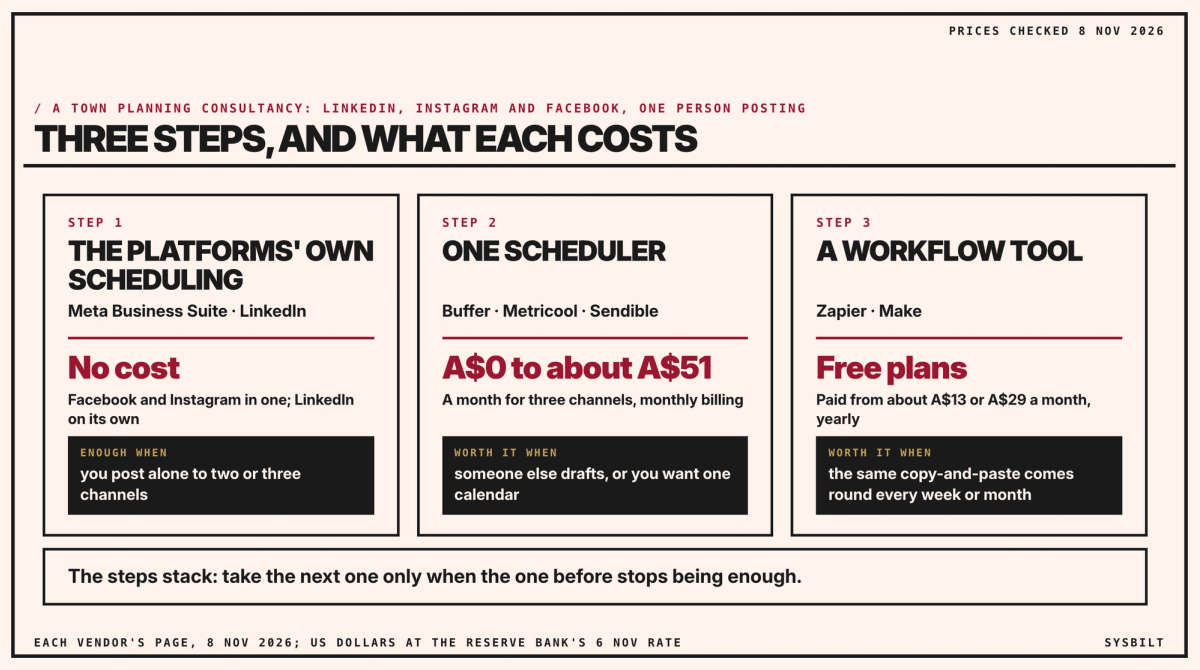
For three channels, posting alone, you may not need a tool yet. Meta Business Suite is free to use, and it schedules posts, stories and reels to your Facebook Page and Instagram account from one calendar (Meta). LinkedIn lets a Page admin schedule a post from an hour to three months ahead (LinkedIn). It can't schedule a post with several photos, a poll or a reshare, so a project update with a gallery goes up by hand, or as a scheduled post with one photo. A scheduler can help here: Metricool says it schedules LinkedIn posts with up to 20 images (Metricool); with Buffer or Sendible, try a gallery post in the trial.
That's two places to plan in, at no cost, and for one person posting to three channels it's where to start. The limits show when someone else starts drafting, when you want all three channels in one calendar, or when you want their results side by side.
Move to one scheduler when it's more than you
One calendar for three channels costs little, and while you post alone it can cost nothing.
| Buffer | Metricool | Sendible | |
|---|---|---|---|
| To start | Free plan: 3 channels, 10 scheduled posts each, 1 user | Free plan: 1 brand, no LinkedIn | 14-day trial |
| A month for three channels | Essentials, US$18, about A$26 | Starter, US$25, about A$36 | Core, US$35, about A$51 |
Prices are from each tool's pricing page on 8 November 2026 (Buffer, Metricool, Sendible), in US dollars, at the Reserve Bank's rate on 6 November, on monthly billing; paying yearly takes 14 to 20% off. Metricool's Starter plan is one price for up to five brands, LinkedIn included, and Sendible's Core plan one price for up to six profiles. Buffer's free plan holds 10 scheduled posts per channel at a time and frees a slot each time one goes out (Buffer), which covers a week's batch.
While you post alone, the platforms' own scheduling or Buffer's free plan will do. Pay when someone else starts drafting: our post on the best social media scheduling tool for your business compares the three for a team with approvals.
The steps stack, and you take the next one only when the one before stops being enough:
Add a workflow tool for the copy-and-paste
A scheduler publishes what you put in it. A workflow tool such as Zapier or Make moves things between your tools, so the copying stops.
For you, the one worth building is the monthly article. When it goes up, the tool reads your website's RSS feed, the automatic list of new articles (your web developer can tell you if yours has one), and adds a post with the article's title and link to your scheduler's queue. Zapier and Make both have ready-made steps for this with Buffer (Zapier, Make), Zapier can create scheduled posts in Sendible (Zapier), and Metricool connects to both on its Advanced plan, about A$77 a month paid yearly (Metricool). Sharing your own article is distribution: you made the judgement when you wrote it.
Both have free plans: Zapier's with 100 tasks a month (Zapier), Make's with 1,000 credits (Make). Paid plans start at about A$13 for Make and A$29 for Zapier a month, paid yearly (US$9 and US$19.99, checked 8 November 2026). Build one only when it removes a copy-and-paste that comes round every week or month. If it doesn't, it's one more thing to look after.
An hour a week
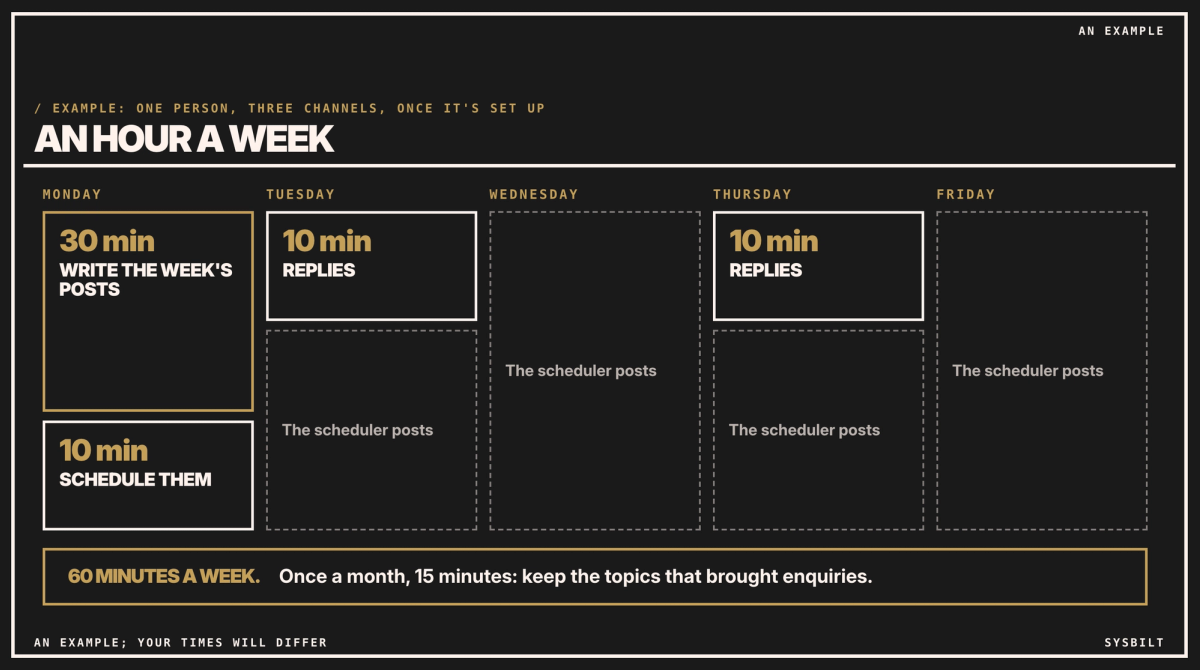
Here's what the week can look like once it's set up:
- Monday, 30 minutes: write the week's posts from the month's plan, for example three from one article: what changed, on LinkedIn; a photo of the site, on Instagram; the link and a question, on Facebook. Our post on creating 30 days of content in one afternoon covers the plan.
- Monday, 10 minutes: schedule them, with the tracking tags on each link.
- Tuesday and Thursday, 10 minutes each: reply to comments and messages, then close the app.
- Last Friday of the month, 15 minutes: check which posts brought visits and enquiries.
Check it's working
Add tracking tags to the links you share. A tracking tag is a few words on the end of a link that tell Google Analytics where the visit came from, and Analytics then shows those visits in its Traffic acquisition report. Google's own URL builder adds them for you (Google): set up the three tags once, in about ten minutes, then paste the tagged link when you schedule each post. Use the same three every time: the channel as the source, "social" as the medium and the month as the campaign.
Then count the enquiries that mention a post. Once a month, keep the topics that brought enquiries and drop the ones that didn't.
The free options cover most of this. If you'd rather have it set up, we set up the scheduler, the article feed and the tracking with you. That's part of our Content Systems service.
If you'd like a second pair of eyes, book a 15-minute call with our team in Sydney, by phone or video. Bring the channels you post to and your last article, and we'll show you which parts of your week a tool can take, so you leave with a short list of what to set up first. There's no obligation after the call, and we don't upsell.
See how we fix this
See the exact system we build to fix this
Book a call to build your weekly content system
WRITTEN BY
Felipe Chaparro
Systems Architect and Founder of SYSBILT. Felipe engineers custom automation, AI workflows, and performance web architectures for scaling Australian service businesses.