How to write a weekly email newsletter in 10 minutes: one four-part template, a list the team fills all week, the Spam Act basics and two tools to send it.
In this article
Your clients would value a weekly email telling them which grant rounds are open. You've started one three times. Each time it took an hour and a half to write, and by the fourth week it had stopped.
Here's how to write a weekly email newsletter in 10 minutes: one template with the same four parts, a list the team fills during the week, ten minutes on send day, and the rules every Australian sender has to follow. The ten minutes is the writing. The research, finding and checking the rounds, moves out of send day and into a short routine during the week.
The short answer
Build one template with four parts: one short insight, what's open or new, one useful link, one call to action. Keep a running list of ideas through the week, so on send day you pick one and fill the template. Send only to people who agreed, with your name on it and an unsubscribe link.
Why it takes an hour and a half
Every week you start from a blank page and decide everything again: the topic, the layout, the subject line, what to ask people to do. The writing is the quick part. The deciding is what takes the time, so the fix is to decide once.
The same four parts every week
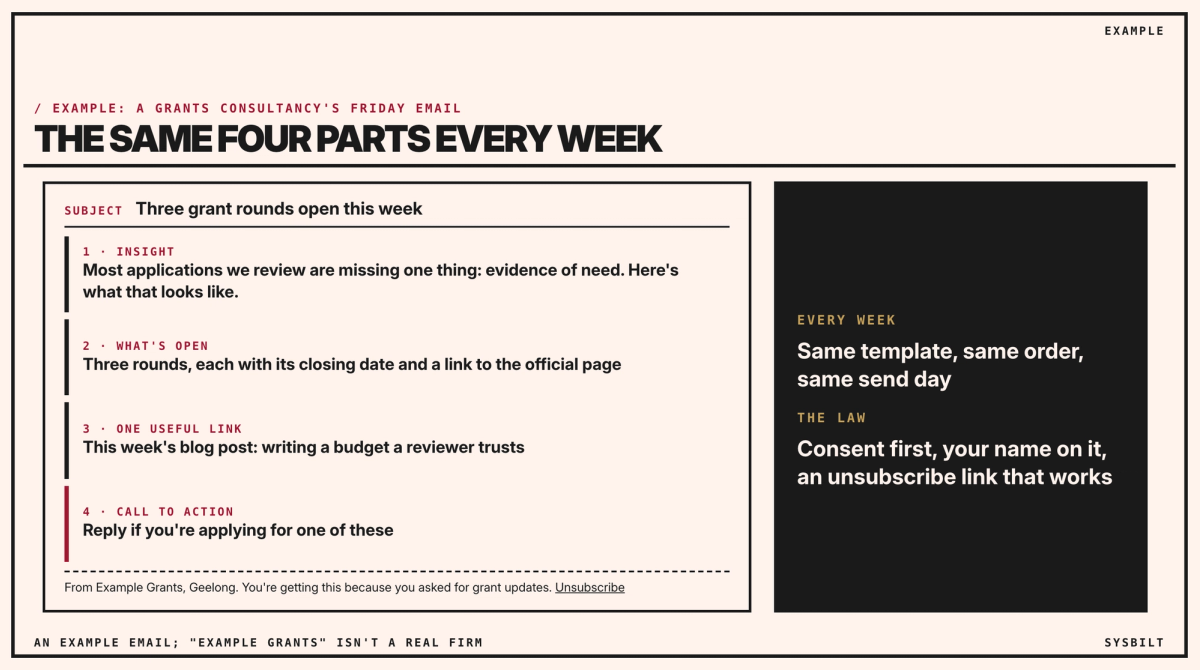
- 01An insight, three or four sentences in your own words, such as the one thing most applications you review are missing.
- 02What's open: three rounds, each with its closing date and a link to the official page.
- 03One useful link, such as this week's blog post.
- 04One call to action: "Reply if you're applying for one of these."
Save it as a template in your email tool, with the same layout and the same order, and send it on the same day every week. Filled in, one week's email reads like this:
- Subject: Three grant rounds open this week
- Insight: "Most applications we review are missing one thing: evidence of need. Before you write a word, list three numbers that show the problem you're solving."
- What's open: three rounds, each as one line with its name, who it's for, its closing date and a link to the official page.
- Link: "This week on our blog: writing a budget a reviewer trusts."
- Call to action: "Reply if you're applying for one of these, and we'll tell you whether it's worth it."
One person owns the send, such as your office administrator, with a consultant as back-up. Put it in the owner's calendar as a recurring 15-minute slot, with the back-up invited, so a busy week doesn't end it. If the list is thin, or the owner is away, send the short version: just what's open.
Fill the list during the week
The ten minutes only works if the material is waiting. Keep one shared list, in a document or a spreadsheet, and ask the whole team to add to it as they go:
- New rounds, from a set routine: one consultant spends 20 minutes on Tuesday and again on Thursday, checking the same pages each time, filtered to your clients' sectors and regions. For Australian Government grants, GrantConnect publishes current and forecast opportunities; add your state's and council's grant pages to the same weekly check. Whoever adds a round adds its link to the official page, and the Thursday check confirms each closing date there again, because rounds change. Link to the official page rather than restating its rules, so readers check the source.
- Questions clients asked, or a mistake you saw in an application, which become next week's insight.
- Anything you published, which becomes the useful link.
On send day, pick the three rounds that suit the most clients. If only one is open, send one.
Our post on creating 30 days of content in one afternoon covers keeping a bank of ideas like this one.
The ten minutes
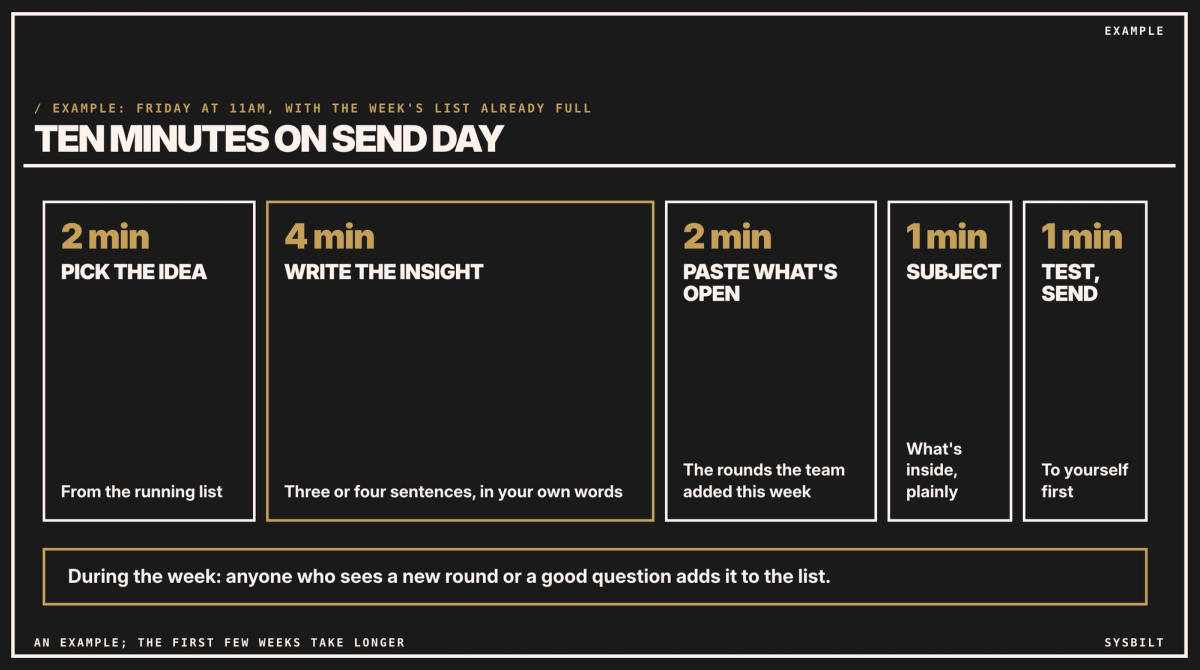
On send day, with the list already full:
- 2 minutes: pick the idea from the list.
- 4 minutes: write the insight, in three or four sentences.
- 2 minutes: paste in the week's open rounds and the link.
- 1 minute: the subject line, saying plainly what's inside.
- 1 minute: send a test to yourself, then send it.
In this example, the first few weeks take closer to half an hour on send day, until the template and the list are routine. Finding and checking the rounds is separate work, spread across the week, and it's the part that makes the email worth opening. Counted together, that's about 50 minutes a week across two people: 20 minutes on Tuesday and again on Thursday, and 10 on Friday, against an hour and a half before.
The rules
Under the Spam Act, the Australian Communications and Media Authority sets out three things for marketing emails: get consent, identify yourself as the sender, and make it easy to unsubscribe (ACMA). In its words, "you must first have consent from the person who will receive them". So send only to clients and contacts who asked for the updates, put your business name and contact details in every email, keep the unsubscribe link in the template, and take people off the list within five working days of asking. If you're not sure your existing client list has agreed, ask them once: a one-line email inviting them to opt in.
Two tools to send it with
| Tool | What it costs, checked 7 and 8 November 2026 |
|---|---|
| Mailchimp | A free plan for fewer than 250 contacts; Essentials about A$18.88 a month for up to 500 contacts, an estimate before tax. The price follows your contact count, unsubscribed contacts included |
| HubSpot | A free plan for up to two users and 1,000 contacts; Starter US$20 (about A$29) a seat a month, before tax, with a lower price for new customers |
Prices are from each tool's own pricing page (Mailchimp, HubSpot); HubSpot's are in US dollars, at the Reserve Bank's rate of A$1 = US$0.69 on 6 November. Both let you save a template and reuse it each week; check that its footer carries your unsubscribe link before the first send. Choose by fit: Mailchimp suits one person sending to a small list, and HubSpot suits a team that wants contacts and emails in one shared system. If your list is under 250, either free plan will do to start.
Start this Friday
- 01Build the template, with the four parts and your unsubscribe link, and save it.
- 02Start the list and share it with the team.
- 03Send the first one on Friday, even if it isn't perfect.
Our post on a B2B content strategy for service businesses covers where the newsletter fits with the rest of what you publish.
If you'd rather have it set up, we set it up with your team: the template, the shared list and the send routine, in the tool you choose. That's part of our Content Systems service.
If you'd like a second pair of eyes, book a 15-minute call with our team in Sydney, by phone or video. Bring your last newsletter, or the one you meant to send, and we'll turn it into a four-part template with you, so you leave ready to send on Friday. There's no obligation after the call, and we don't upsell.

WRITTEN BY
Felipe Chaparro
Systems Architect and Founder of SYSBILT. Felipe engineers custom automation, AI workflows, and performance web architectures for scaling Australian service businesses.