Local SEO for Sydney practices, firms and builders: a Google Business Profile checklist, the rules for asking for reviews, and code for your developer.
In this article
Think of a patient in Parramatta looking for a dentist who opens on Saturdays, a company director in North Sydney who needs a new accountant, or a family on the Northern Beaches comparing custom home builders. None of them searches for a business name. They search for the service, look at the three businesses Google shows with a map, and get in touch with the one that looks most complete.
That short list is the map pack. Local SEO, short for local search engine optimisation, is how a Sydney business earns a place in it and in the ordinary results underneath. Most of the work sits with things you control: your Google Business Profile (your listing on Google Maps and Search), how you ask for reviews, your website, and a short block of code for your web developer.
The short answer
For a Sydney business, local SEO is the work that puts you in Google's map results, and the results under them, when someone nearby searches for what you do. The map leans most on your Google Business Profile: the right primary category, accurate hours and a steady run of genuine reviews. The results below lean more on your website.
Where to start: a four-week plan
Whether you're starting from scratch or tidying a profile you already have, we'd do it in this order, biggest levers first. Your practice or office manager can run weeks one, two and four, which are short admin tasks. Week three takes longer, because someone has to write the page.
| Week | Focus | What to do |
|---|---|---|
| Week 1 | Profile | Work through the checklist below: category, hours including public holidays, services, photos and the website link |
| Week 2 | Reviews | Add the review link to the message every client gets at the end of an appointment or project |
| Week 3 | Website | Publish or improve one service page, and ask your web developer to add the code below |
| Week 4 | Listings | Match your name, address and phone on Apple Maps, Bing and your industry directories |
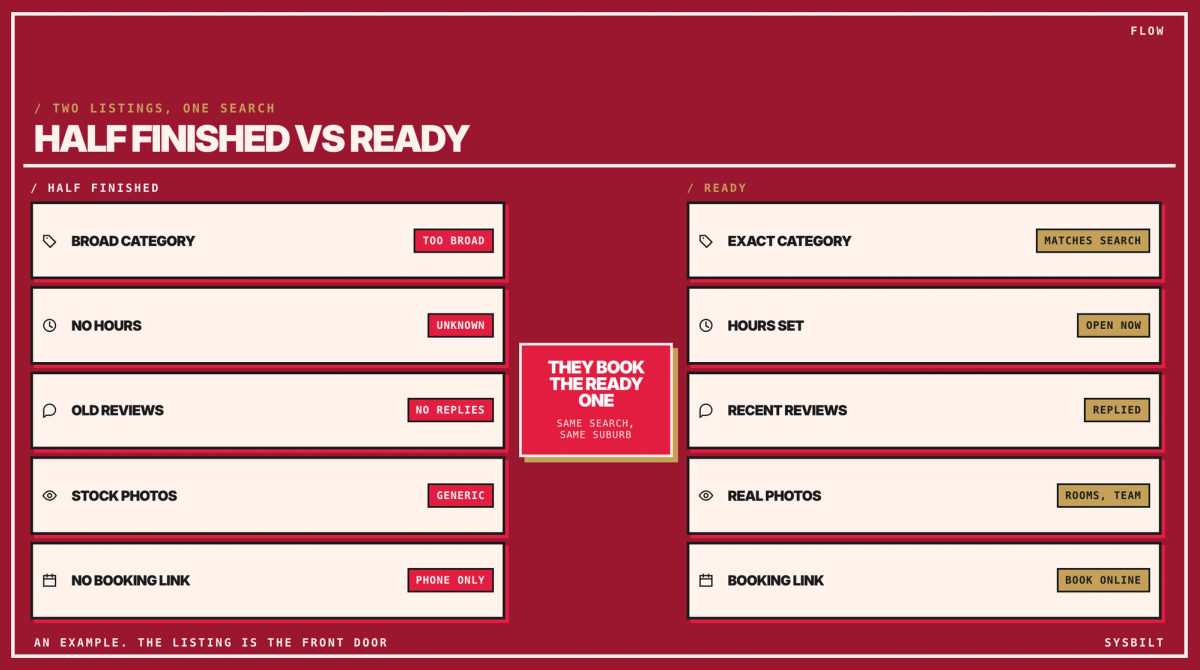
Already have a profile? Compare it with the ready listing below, and start with any row that looks like the half-finished one.
How local SEO works in Sydney
Google says its local results are based mainly on relevance, distance and prominence. Relevance is how well your profile matches the search, and distance is how far you are from the person searching. Prominence is how well known you are, which takes in your reviews and the websites that link to you.
Distance is the one you can't change, which is why the same search shows different practices in Parramatta and Chatswood. It's also why checking your ranking from your own desk tells you very little. To see where you really appear, search on a phone from a few suburbs, or use a local rank-tracking tool, which checks your position from many points across your area.
Relevance and prominence are where the work goes. Whitespark, a Canadian local search software company, surveys specialists on this every year. Its 2026 Local Search Ranking Factors, released in November 2025 for the year ahead, asked 47 of them to score 187 factors. They also estimated how much each group counts in three places you can appear: the map pack, the ordinary results below it, and AI answers from tools such as ChatGPT and Google's own AI search.
| What counts (experts' estimates) | What it covers | Map pack | Below the map | AI answers |
|---|---|---|---|---|
| Google Business Profile | Your category, hours and other profile details | 32% | 7% | 12% |
| Reviews | How many, how recent, on Google and other sites | 20% | 6% | 16% |
| Website content | Your details, page titles, service pages | 15% | 33% | 24% |
| Behaviour | How people respond: clicks, calls, time on your page | 9% | 10% | 4% |
| Links | Other websites linking to yours, and how trusted they are | 8% | 24% | 13% |
| Directory listings | Your name, address and phone on other sites | 6% | 7% | 13% |
| Personalisation | The searcher's own history, location and device | 6% | 8% | 9% |
| Social | Your social media following and activity | 4% | 5% | 9% |
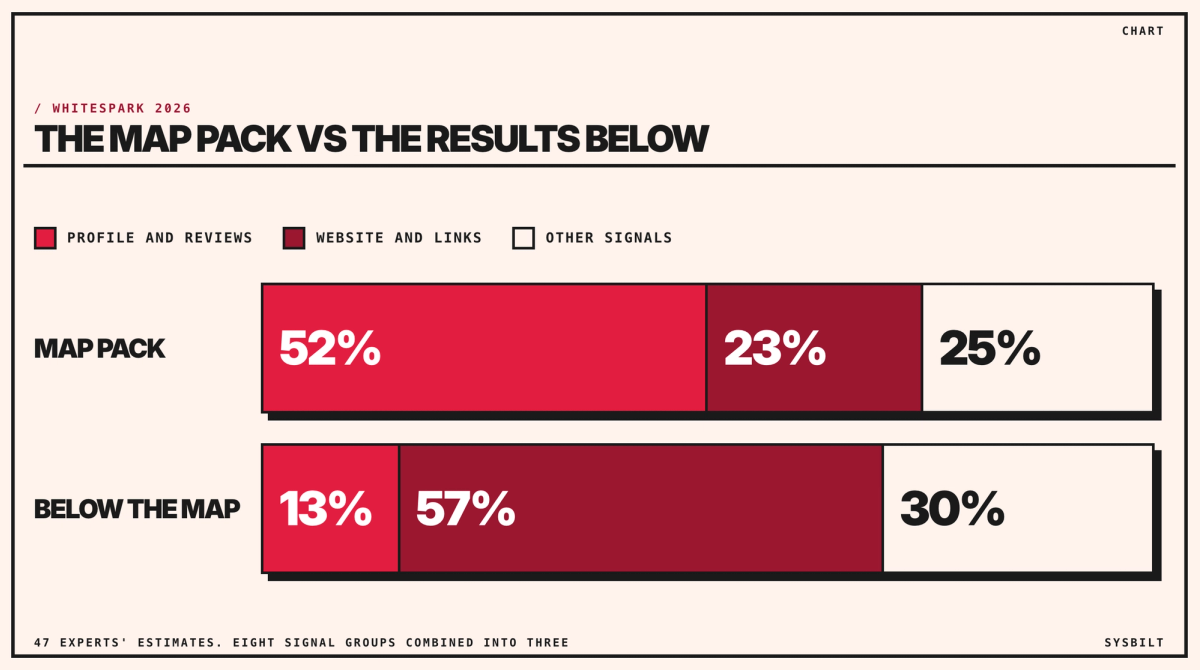
Read down the columns and the two results want different things. In the experts' estimates, your profile and its reviews carry 52% of the weight in the map pack, while below the map your website and the sites linking to it carry 57%. The strongest single factor in the map pack is the primary category on your profile, so the profile is where to start.
Your Google Business Profile checklist
Your Google Business Profile is the listing that appears in the map pack and on Google Maps. People can call you, ask for directions or open your website straight from it, so treat it as your front door. We'd work through it in this order.
- 01Claim and verify it. Verification tells Google you're authorised to manage the business, which Google says makes the profile more likely to appear in search. If an agency set it up, make sure someone in your business is the profile's primary owner, with the agency added as a manager.
- 02Use your real business name, exactly as it appears on your signage, website and letterhead. Adding a suburb or a service breaks Google's guidelines and can get the profile suspended. The survey rates keywords in the name highly, which is why you'll see competitors try it, but it isn't worth losing the listing.
- 03Choose the most specific primary category that's true for you. It's the strongest factor you control. A general dental practice stays under Dentist, and a firm that mostly builds one-off homes belongs under Custom home builder rather than General contractor. Health practices should use a specialist category, such as Orthodontist, only where a registered specialist practises, because specialist titles are protected. Google doesn't publish its full list of categories, so type a few options into the field and read what comes up. Add extra categories only for work you actually do: Google asks for the fewest categories that describe your core business.
- 04Set your real hours and keep them current, including Saturdays, late nights and public holidays, which Google lets you add as special hours. Being open when someone searches is one of the survey's strongest map factors, and a profile with no hours counts against you.
- 05Show your address if clients come to you. A clinic, a firm's office, or a builder's display home or showroom that's signed and staffed during your hours can show its address. If you only work at clients' sites, hide the address and set a service area, which Google says shouldn't reach beyond about two hours' drive from your base. Virtual offices and PO boxes aren't eligible.
- 06List your services in your clients' words. Pick the services Google suggests for your category, then add your own, such as dental implants, SMSF audits or knockdown rebuilds. Use the description to say what you do, for whom and where, in plain sentences: the survey now counts a description stuffed with keywords against you.
- 07Add real photos of your rooms, your team and your finished work, and skip stock images. Skip AI-generated ones too, which the survey now lists as a risk to the profile.
- 08Link to the right page. Point the website link at your homepage, or at each location's own page if you have several. Make sure that page shows the same name, address and phone number as the profile. If clients book online, add your booking link as well.
- 09Match your details everywhere else. Use the same name, address and phone number on Apple Business Connect, which manages your Apple Maps listing, and on Bing Places. Do the same in the directories your clients use: the national healthdirect Service Finder for health services, your professional body's member directory, and industry associations such as Master Builders or the HIA. In the survey, these listings carry 13% of the weight in AI answers, against 6% in the map pack.
Should each practitioner have their own profile?
Clinics and firms ask this often, and Google's guidelines set the test. A practitioner who deals with clients directly and can be contacted at the practice during its hours can have a profile of their own. Google names doctors, dentists, lawyers and financial planners as examples, and the same test fits an accountant or adviser who sees clients under their own name. Reception and admin staff can't have one.
| Your situation | What Google allows | What to watch |
|---|---|---|
| Several practitioners at one practice | A profile for the practice, plus one for each client-facing practitioner | The practitioner's profile carries their name only, not the practice's |
| One practitioner working under a practice brand | One shared profile | Name it in the format Practice name: Practitioner name |
| A builder who works on clients' sites | One service-area profile with the address hidden | Keep the service area within about two hours' drive |
| More than one staffed location | One profile per location | Use the same name and category on every location |
Our answer for a practice with two to four practitioners: start with the practice profile, and add a practitioner profile only for someone patients or clients search for by name. The reason: profiles in the same category at the same address compete, and Google may show only one of them. The survey ranks this among the worst problems a profile can have.
How to ask for Google reviews
Reviews count twice: they help you rank, and they help people choose you. Google says more reviews and positive ratings can help your local ranking. The survey's experts rate a high Google rating as the strongest factor in whether a searcher gets in touch, and they favour a steady flow over a sudden rush. So make the request part of how every appointment or project ends, rather than a campaign. For a builder with a handful of handovers a year, that means asking every client, every time.
Google's rules for asking are short, and they're the ones that get listings into trouble:
- Ask every client, not only the ones you think are happy. Google doesn't let businesses ask selectively for positive reviews or discourage negative ones.
- Don't offer anything in return, whether it's a discount, a gift or something else.
- Don't pressure anyone to review you while they're still with you, and don't tell them what to write, including which staff member to mention.
- Don't give your team a target number of reviews to collect.
Australian law takes the same view. In 2018 the Federal Court ordered Meriton to pay $3 million in penalties after it stopped guests it expected to be unhappy from receiving TripAdvisor's review invitations.
Your profile gives you a review link and QR code to share. The simplest system is one short message with the link, sent to every client after an appointment or handover: "Thank you for choosing us. If you have a minute, we'd value a Google review: [link]". For regular patients, once a year is plenty, and if your booking system sends follow-up messages, put it there. Reception can mention it at checkout or hand over a card with the QR code, since Google itself suggests displaying the code. What Google rules out is pressure, such as asking someone to write the review there and then.
Reply to reviews, good and bad, in a sentence or two, and take a complaint offline rather than arguing it in public. Never use a reply to reveal anything about the person. In 2024 the privacy regulator, the OAIC, found a real estate agency had interfered with a tenant's privacy. Its reply to his Google review had named him and described his occupation and finances. If a review is fake or breaks Google's rules, you can report it from your profile, though Google won't remove one just because you disagree with it.
If you run a health practice
Health practices have one more rule. The National Law, which regulates registered health practitioners, bans testimonials in advertising for their services. Ahpra defines a testimonial as a positive statement about the clinical side of care: the symptom, the diagnosis or treatment, or the outcome. Patients can still review you on Google, and you don't have to chase the removal of reviews on sites you don't control. Avant, a medical defence organisation, says Ahpra has confirmed practices can ask patients for ratings on sites like Google, as long as every patient is asked the same way.
What you can't do is reuse clinical reviews in your own advertising, including your website and social pages. Reviews that don't mention clinical care, such as comments about your reception team, can go on your website, as long as you show them whole and don't pick only the best. Ahpra also advises care when replying, since engaging with a review can count as using it, and it doesn't publish sample replies. So keep replies short and general, and don't repeat anything the reviewer said about their care:
- To a good review: "Thank you for taking the time to leave a review."
- To a bad one: "We're sorry to read this. Please call our practice manager on [number] so we can talk it through."
If a review needs more than that, your defence organisation can advise.
What your website adds
The profile wins the map. The results below it are ordinary search results, and they lean on your website, which is why the two do different jobs and you need both. The survey's top three factors for those results are a dedicated page for each service, content that names the areas you serve, and links from trusted websites.
Give every main service its own page, written in the words clients search, saying who it's for, what's involved and which suburbs you cover. Skip the near-identical page for every suburb. Google's spam policies treat near-copies with only the place name changed as spam, which they call doorway pages. If an agency built pages like that for you, merge them into your service pages, and keep a location page only where you have a location.
Put your name, address and phone number on every page, exactly as they appear on your profile, because that match counts for the map as well. Then open the page on your phone. A site that works well on a phone is one of the things that turn a search into an enquiry, and how quickly the page loads counts too.
Links count for far more here than in the map pack, 24% of the weight against 8%. The useful ones come from your area or your industry: your professional body or association, the local business chamber, suppliers and partners, and local news coverage of your work.
How to show up in AI answers
AI answers are the newest place to be named, and Whitespark added them to its survey for 2026. Most of the top factors there are about what others publish about you: expert "best of" lists, industry websites, news articles and associations. A dedicated page for each service on your own site also ranks near the top. So it's the same work done in more places. Keep your listings current in your industry's directories, collect reviews on the sites your clients already use, and go after the awards, features and memberships that put your name on other people's websites.
Structured data for your website
Structured data is a short block of code in a page that states your business details in a format Google reads directly, instead of working them out from the text. It uses schema.org, a shared vocabulary for this kind of code. Google's documentation asks for the most specific type for your business, such as Dentist, AccountingService or HomeAndConstructionBusiness, with your name and address at minimum.
Keep the expectation realistic. The survey puts structured data 118th of 187 factors for the map pack, so it won't lift you into the map on its own. It earns its place by removing doubt about who you are and where you work, and once it's in, it only needs changing when your details do.
For your web developer
This code tells Google a practice's name, address, phone number and opening hours. The example is for a made-up dental practice in Parramatta; for a firm or a builder, the only change is the type, AccountingService or HomeAndConstructionBusiness instead of Dentist. Send it to whoever looks after your website, with your own details. Ask them to add it to the page your Google profile links to, usually the homepage, and to check it with Google's Rich Results Test, which flags any errors.
<script type="application/ld+json">
{
  "@context": "https://schema.org",
  "@type": "Dentist",
  "@id": "https://www.example.com.au/#practice",
  "name": "Your Practice Name",
  "url": "https://www.example.com.au/",
  "telephone": "+61 2 0000 0000",
  "address": {
    "@type": "PostalAddress",
    "streetAddress": "Suite 2, 10 Example Street",
    "addressLocality": "Parramatta",
    "addressRegion": "NSW",
    "postalCode": "2150",
    "addressCountry": "AU"
  },
  "openingHoursSpecification": [
    {
      "@type": "OpeningHoursSpecification",
      "dayOfWeek": ["Monday", "Tuesday", "Wednesday", "Thursday", "Friday"],
      "opens": "08:00",
      "closes": "17:30"
    },
    {
      "@type": "OpeningHoursSpecification",
      "dayOfWeek": "Saturday",
      "opens": "08:30",
      "closes": "13:00"
    }
  ],
  "sameAs": [
    "https://www.facebook.com/yourpractice",
    "https://www.instagram.com/yourpractice"
  ]
}
</script>
Leave reviews and star ratings out of it. Since September 2019, Google hasn't shown review stars in its search results for reviews a business puts on its own website. That covers reviews in its code and in embedded review widgets. Your Google profile's rating isn't affected. You don't have to remove a reviews box from your site for Google, but a health practice should check it against the testimonial rule above.
No web developer? Use this prompt
Paste this into ChatGPT, fill in the brackets, and it will write the code for your business. Check every detail against your Google profile, because the two should match exactly. Most website builders, including WordPress, Squarespace and Wix, have a setting for adding code to a page's header, which is where it goes. If you're not sure, whoever manages your site can add it.
I run [type of business, for example a dental practice] in [suburb], Sydney.
Write LocalBusiness structured data in JSON-LD for my website, using the most
specific schema.org type for my business. Use only these details:

Name, exactly as on our signage: [name]
Website: [web address]
Phone, with +61: [number]
Street address and postcode: [address]
Opening hours for each day: [hours]
Our social profiles: [links]

Don't add reviews, star ratings or any detail I haven't given you. Give me the
complete script tag to paste into my homepage, and tell me how to test it with
Google's Rich Results Test.
After the first month
From then on, it's a monthly habit: check the profile is still accurate, reply to new reviews, add a few recent photos, and read the profile's Performance report. It shows the searches that found you and what people did next, from calls and website clicks to direction requests and bookings. Its search terms also tell you which words your service pages should use. Recency counts for reviews, so the habit matters more than any one push.
If you'd like the profile, the service pages and the code done together, that's part of our Websites & E-commerce service, which covers business websites, not just online shops.
Book a call if you'd like us to look at your listing and the page it links to with you, and tell you what we'd fix first.

WRITTEN BY
Felipe Chaparro
Systems Architect and Founder of SYSBILT. Felipe engineers custom automation, AI workflows, and performance web architectures for scaling Australian service businesses.