
How to document business processes your team will read: the test a good document passes, five rules, and a 15-minute way to capture a process.
In this article
Two years ago you wrote a 40-page operations manual over a long weekend. Nobody opens it. Each payroll officer still runs their clients their own way, and now a senior officer has resigned, with four weeks to hand over what's in her head.
Here's how to document business processes your team will read: why most process documents go unread, the test a good one passes, five rules, and a way to capture a process that takes only 15 minutes of your expert's time.
The short answer
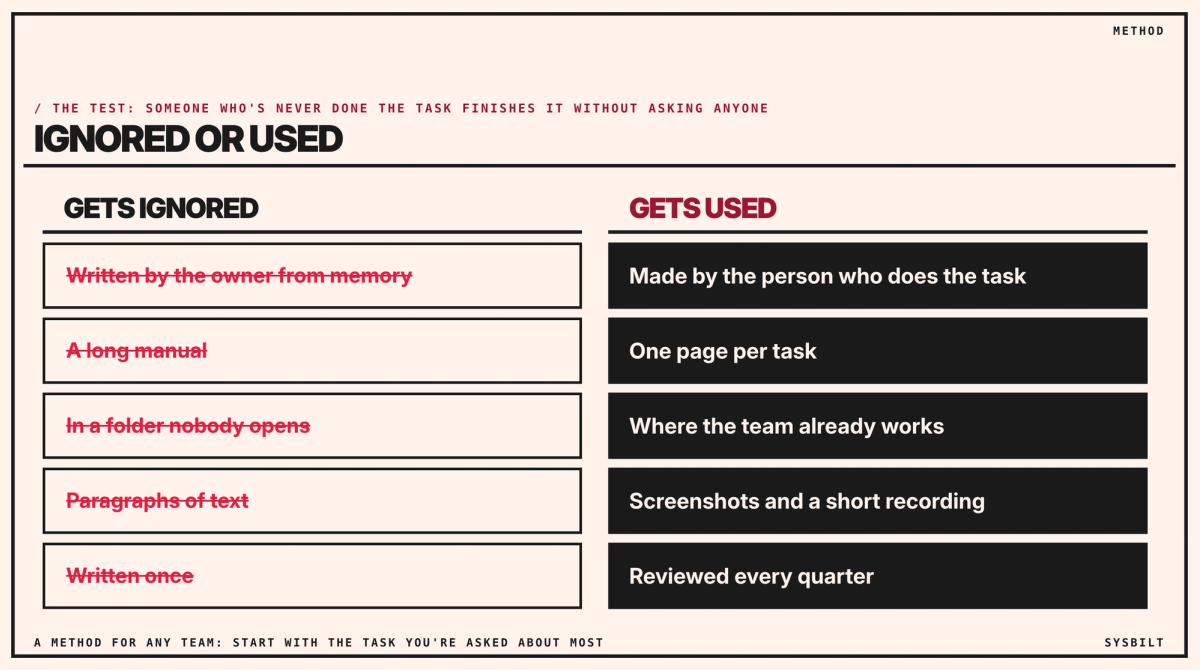
Process documents get read when the person who does the task makes them, each covers one task on one page, they show the screens, they live where the team already works, and someone reviews them every quarter. Start with the task you're asked about most: record the expert for 15 minutes, and have someone else write the page.
Why process documents go unread
Most process documents are written by the owner, from memory. You skip the steps you no longer notice, you refer to things that only make sense if you were there from the start, and you write far more than anyone needs to do one task. The team opens the file once, gets lost, and asks you instead.
The cost shows when someone leaves. In the year to February 2026, just over 1.0 million employed Australians, 7.2%, changed their employer or business, down from 7.7% the year before (ABS). Even at that lower rate, a firm of 24 like yours loses one or two people a year, and whatever they knew that isn't written down leaves with them.
The test a good document passes
Someone who has never done the task picks up the document and finishes it without asking anyone. If they still have to ask, the document has failed, however thorough it looks.
Five rules for documents people use
The person who does the task makes the first version
Your version reflects how you think the work happens. Theirs shows what actually happens on a Tuesday morning, including the workarounds you didn't know about. For a payroll officer, that's the real order of a pay run, not the one in the manual. If three officers do the same task three ways, record all three, compare them in a half-hour meeting, and have the team lead choose the one with fewer steps and fewer errors. Everyone follows it from the next pay run.
One task, one page
"Process a new client's first pay run" is one document. "Payroll" is a manual nobody will read. If a task needs more than a page, it's usually two tasks. Each page has the same parts. For example:
- Task: New client, first pay run.
- When: before the client's first pay date with you.
- You need: the employee list, pay rates, leave balances and the client's signed authority.
- Steps: set up the client and employees, with a screenshot of each screen; enter rates and balances, and have a second officer check them; run the pay run in draft and compare it with the client's last payslips; send the draft to the client to approve; process it and file the approval.
- Exceptions: casuals on more than one rate, and anyone starting mid-cycle, each with its own page.
- Owner and review: the team lead, every quarter.
Show the screens
For anything done in software, a numbered list with screenshots, or a two-minute screen recording, beats paragraphs. Windows and macOS both have a screen recorder built in, so you don't need a new tool to start. Keep the words for the reasons and the exceptions.
Keep it where the team already works
If the team works in Microsoft 365, keep the documents there; if it's Google Workspace or Notion, keep them there. A separate system with its own login becomes one more place nobody opens. Our post on the best software for writing procedures compares the options, and our post on Notion vs Google Drive, under Related articles at the end of this page, helps if you're choosing between those two.
Review every quarter
A document for a process that has since changed is worse than none, because it teaches the old way. Give each document an owner and a review date, update it the same week a rule or rate changes, and delete what no longer matches the work.
Fifteen minutes of your expert's time
The usual objection is time: everyone's already flat out. So don't ask them to write.
- 01Record. Sit with the person for 15 minutes while they do the task and talk through it, with the screen recording.
- 02Write it up. Someone else, ideally whoever will take the task over, turns the recording into one page, and learns the task as they do. If a transcription tool drafts it, use one in a business plan you already pay for, such as your video-meeting software's transcription, not a public AI tool.
- 03Test it. Hand the page to someone who's never done the task, and fix wherever they get stuck.
- 04Store and date it, where the team works, with an owner and a review date.

Recording screens with client data
Payroll screens show names, pay, tax details and tax file numbers. Tax file numbers have their own rules: the TFN Rule applies whatever your size, limiting when they can be recorded or used and requiring them to be kept secure (OAIC). So record on a test client wherever you can, keep recordings in the same place and with the same access as the client files, and don't put them into public AI tools: the privacy regulator's advice is not to put personal information into publicly available AI tools (OAIC).
When someone resigns: a four-week plan
These numbers are an example, so use your own. Say the officer who's leaving runs 30 client payrolls. Twenty-seven of them follow the same eight tasks, and three have quirks of their own. That's eleven recordings of 15 minutes, under three hours of her time. Allow about an hour to write up each page and a quarter of an hour to test it, so about an hour and a half per process in all: about 14 hours from the rest of the team over the four weeks, on top of her three.
- Week 1: list her tasks and clients, and mark what only she knows.
- Week 2: record the eight common tasks; whoever takes over her clients writes them up.
- Week 3: record the three exceptions, and the new person runs a pay run while she watches.
- Week 4: the new person runs them alone, she checks, and the pages get fixed.
Who keeps it current
Choose one person on the team, not you, to own the documents: they keep the list, chase the quarterly reviews and notice when a process has drifted. The point of documenting is to stop everything depending on you, so you can't be the one keeping it.
Then make updates a habit. Whoever finds a wrong or missing step fixes it on the spot, and whoever sets up a new process writes its page before moving on.
Start this week
- 01Pick the task you get asked about most, or the one only the person leaving knows.
- 02Record the expert for 15 minutes while they do it.
- 03Have someone else write the page, and test it on a colleague.
With a resignation in hand, start with the four-week plan above. Our post on what happens if your best employee quits tomorrow covers the rest of the handover.
If you'd rather have it set up, we record and write up your processes with your team, and set up where they live and who keeps them current. That's part of our Team Training service.
If you'd like a second pair of eyes, book a 15-minute call with our team in Sydney, by phone or video. Bring the leaver's list of tasks, or the three you're asked about most, and we'll tell you which to document first and how, so you leave with a plan for the next four weeks. There's no obligation after the call, and we don't upsell.

WRITTEN BY
Felipe Chaparro
Systems Architect and Founder of SYSBILT. Felipe engineers custom automation, AI workflows, and performance web architectures for scaling Australian service businesses.