Why your team refuses the new software you bought: five reasons people go back to the old way, the fix for each, and a 30-day plan to get it used.
In this article
Three months ago, you moved the sales team to a new CRM. The office uses it. Most agents still keep buyers in their phones and a spreadsheet, and vendor reports still get typed up by hand.
If your staff refuse to use the new software you bought, it's rarely stubbornness. Here's why people go back to the old way, what fixes each reason, and a 30-day plan to get the CRM used.
The short answer
People go back to the old way when the new one is slower, when they were shown it once, when the old way still works, or when they don't trust what happens to their contacts. Fix the slowest task first, record task videos, make the CRM the only way for one thing, and run the sales meeting from it.
It isn't only your agency
In a Gartner survey, only 32% of mid-to-senior business leaders said the last change they led achieved healthy adoption by employees, meaning people acted on it, on time, without it hurting their performance or causing undue stress (Gartner, July 2025). That covers change of every kind, not only software, but it's a reminder that buying the tool is the easy part.
It's also money. Every agent who works around the CRM is still a seat you pay for: at, say, A$80 a seat a month, 14 agents is A$13,440 a year, much of it for software that isn't being used (example numbers).
Five reasons people go back to the old way
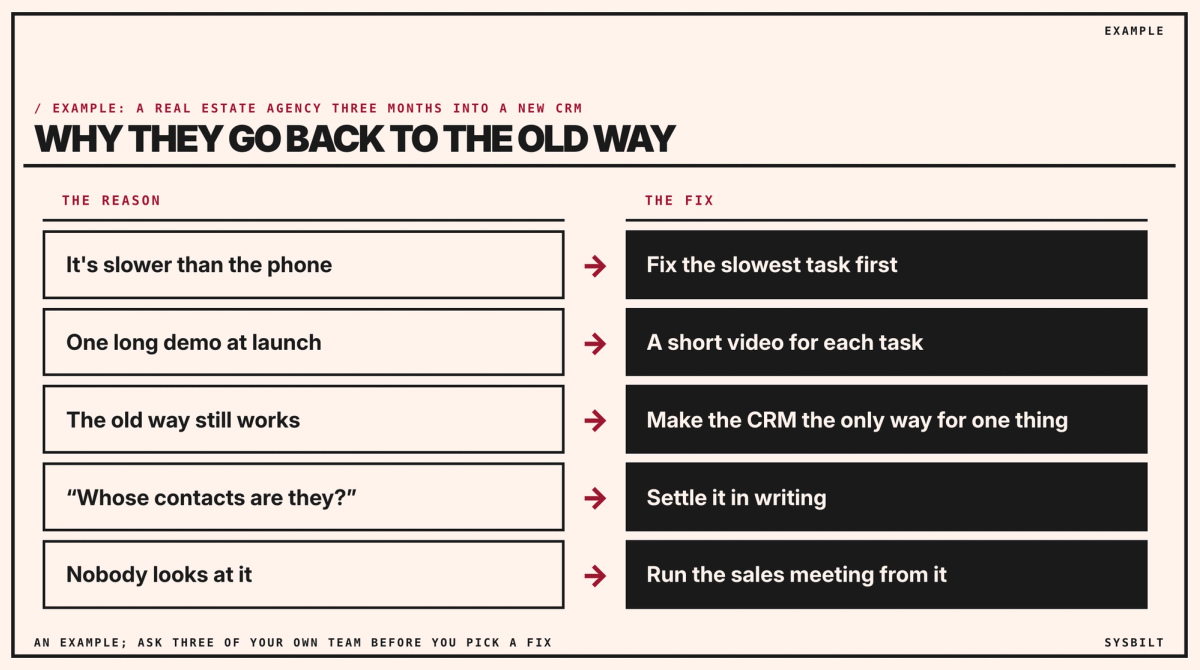
- 01It's slower than the phone. Adding a buyer after an open home takes longer in the CRM than saving a contact in their phone.
- 02They were shown it once. A long demo at launch, then nobody to ask when they got stuck on a Tuesday.
- 03The old way still works. Leads still arrive by text, vendor reports can still be typed in a document, and nothing stops a spreadsheet.
- 04They're worried about their contacts. An agent's buyers and past vendors are their livelihood. If nobody has said what happens to those contacts when an agent leaves, putting them in the agency's CRM feels like giving them away.
- 05Nobody looks at it. If the sales manager never opens it in the weekly meeting, the team reads that as "it doesn't matter".
Fix the reason, not the people
- Ask three agents what's slower than before. Fifteen minutes each, and note the tasks that come up more than once.
- Fix the slowest task first. If adding buyers after open homes is the problem, set up a sign-in form that puts them straight into the CRM, if yours supports one.
- Record a two-minute video for each of the five tasks agents do most, made on a phone by the agent who does each one best, and keep them where agents can find them. Our post on the fastest way to train new staff covers how to record each task and check it's been learned.
- Bring the existing buyers in once. The office imports each agent's spreadsheet and phone contacts, only the buyers and vendors the agent dealt with for the agency, not friends and family, and each agent checks their list. Those buyers gave their number to an agent, not to your CRM, so say in your privacy policy how the agency uses it. Any marketing email or text you then send needs their consent, your agency's name and an easy way to unsubscribe, under the Spam Act (ACMA). Most CRMs can import a spreadsheet, so agents don't spend their evenings typing.
- Make the CRM the only way for one thing. A side door is any way of doing a task that skips the CRM, such as an enquiry forwarded by text. Close one first, and start with something agents want: enquiries from the property portals and your website go to agents through the CRM, and only through the CRM. Ask your CRM provider how those enquiries can go straight into it, and set that up before you close the door. You don't need to ban phones or spreadsheets; once the work lives in the CRM, the old way fades.
- Settle the contacts question in writing. In plain words: what belongs to the agency, what belongs to the agent, and what happens when someone leaves. Your employment contracts may already say; if they don't, ask your lawyer. Then say what agents get back: every enquiry in one place, reminders so no buyer goes cold, and their history safe if their phone is lost. Our post on what happens if your best employee quits tomorrow covers why the business's knowledge belongs in its systems, not in people's phones.
- Run the weekly sales meeting from the CRM screen: the pipeline, the appraisals and the follow-ups that are due.
The next 30 days
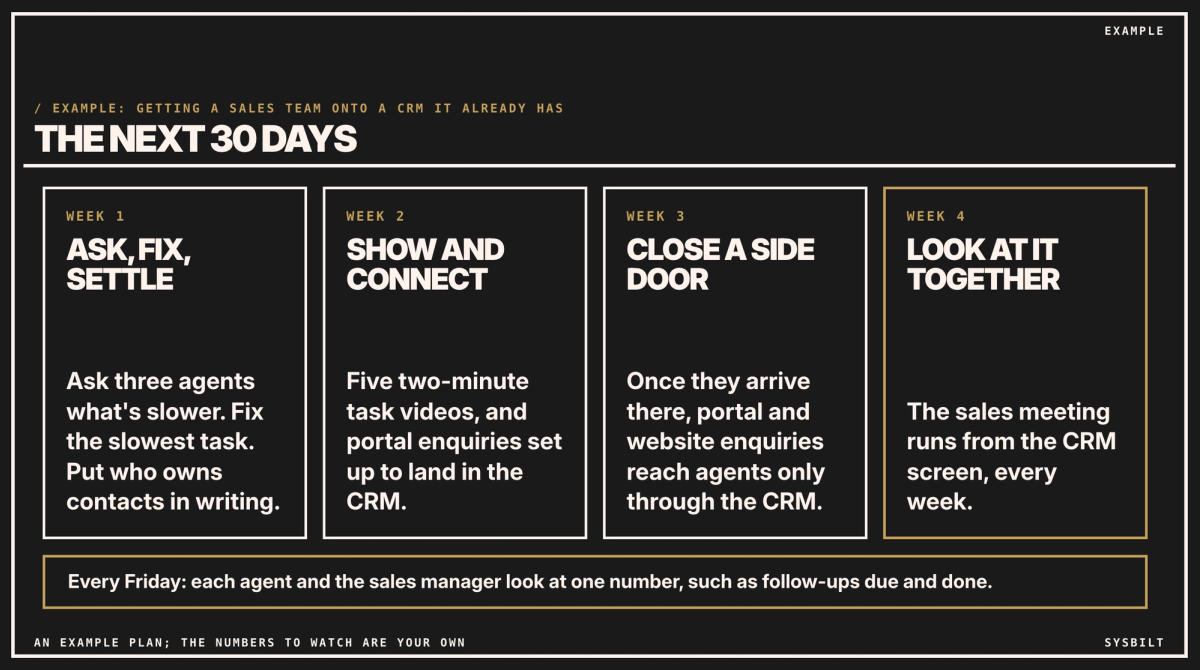
- 01Week 1: ask, fix and settle. Talk to three agents, fix the slowest task, put the contacts agreement in writing, and ask your CRM provider how portal and website enquiries can go straight into it.
- 02Week 2: show and connect. Record the five task videos, and set up the portal and website enquiries with your CRM provider.
- 03Week 3: close a side door, once those enquiries arrive in the CRM: they go to agents through the CRM only. If the connection isn't ready, close it when it is.
- 04Week 4: look at it together. The sales meeting runs from the CRM, every week from now on.
The sales manager runs the plan, and you back them on the contacts agreement and the side door; most of it fits into meetings you already hold. Every Friday, each agent looks at one number with the sales manager, such as follow-ups due and done that week. Pick a number that helps the agent, so no buyer goes cold, and share it as progress, not a ranking.
By day 30, check three things: new enquiries all arrive in the CRM, the sales meeting runs from it, and the Friday number is moving the right way. If all three hold, close the next side door, such as vendor reports typed outside the CRM. If one doesn't, spend the next fortnight on that before adding anything.
If your top agent won't move, start with them. Ask what would make the CRM worth it to them, and fix that first. If the rules apply to everyone except the top agent, the side door stays open for everyone.
When it really is the software
Sometimes the software is the problem: it can't do something your agents need every day, or it's too slow on a phone. If a task is still slower after you've fixed what you can, take it to your CRM provider. And if it can't be fixed, changing tools is better than another year of spreadsheets.
If you'd rather have help, we run the rollout with your team: the task videos, the habits and the check-ins, so the CRM becomes the way work gets done. That's part of our Team Training service.
If you'd like a second pair of eyes, book a 15-minute call with our team in Sydney, by phone or video. Bring the tasks your agents say are slower than before, and we'll tell you which to fix first and which side door to close, so you leave with a plan for the next 30 days. There's no obligation after the call, and we don't upsell.
See how we fix this
See the exact system we build to fix this
Show me where software adoption is breaking in my business
WRITTEN BY
Felipe Chaparro
Systems Architect and Founder of SYSBILT. Felipe engineers custom automation, AI workflows, and performance web architectures for scaling Australian service businesses.